Originally published on LinkedIn. The two Kubernetes diagrams in section 3 are shown here in their full-size draw.io versions. Two years ago most AI conversations started with "which model should we use?". Today, in most of the teams I work with or talk to, the model is the easy part. Projects stall on the plumbing: who is allowed to call what, how tools and data are exposed, how agents talk to each other, how a prompt change is tested before it reaches a customer, and who pays for the GPUs.
I have been on both sides of that plumbing. At IAG I led the architecture of an AI assistant for aircraft operations: an ETL pipeline with AI steps for entity extraction from technical documentation, RAG on Amazon Aurora PostgreSQL with pgvector, hierarchical LangGraph agents, and Langfuse for tracing and evaluation. At Multiverse Computing I led up to four teams building custom LLMs and SLMs for clients, compressing models so they are cheaper to run and fit on devices, and contributed to the definition and design of the benchmark suite used to evaluate them before release.
This article is the map I wish I had at the start: the reference architecture that keeps repeating across sectors, the protocols and gateways that glue it together, how the emphasis changes by industry, a complete worked example for an insurer on Azure, and the two "Ops" disciplines that decide whether any of it survives production: LLMOps and DLOps.
1. One reference architecture, five layers
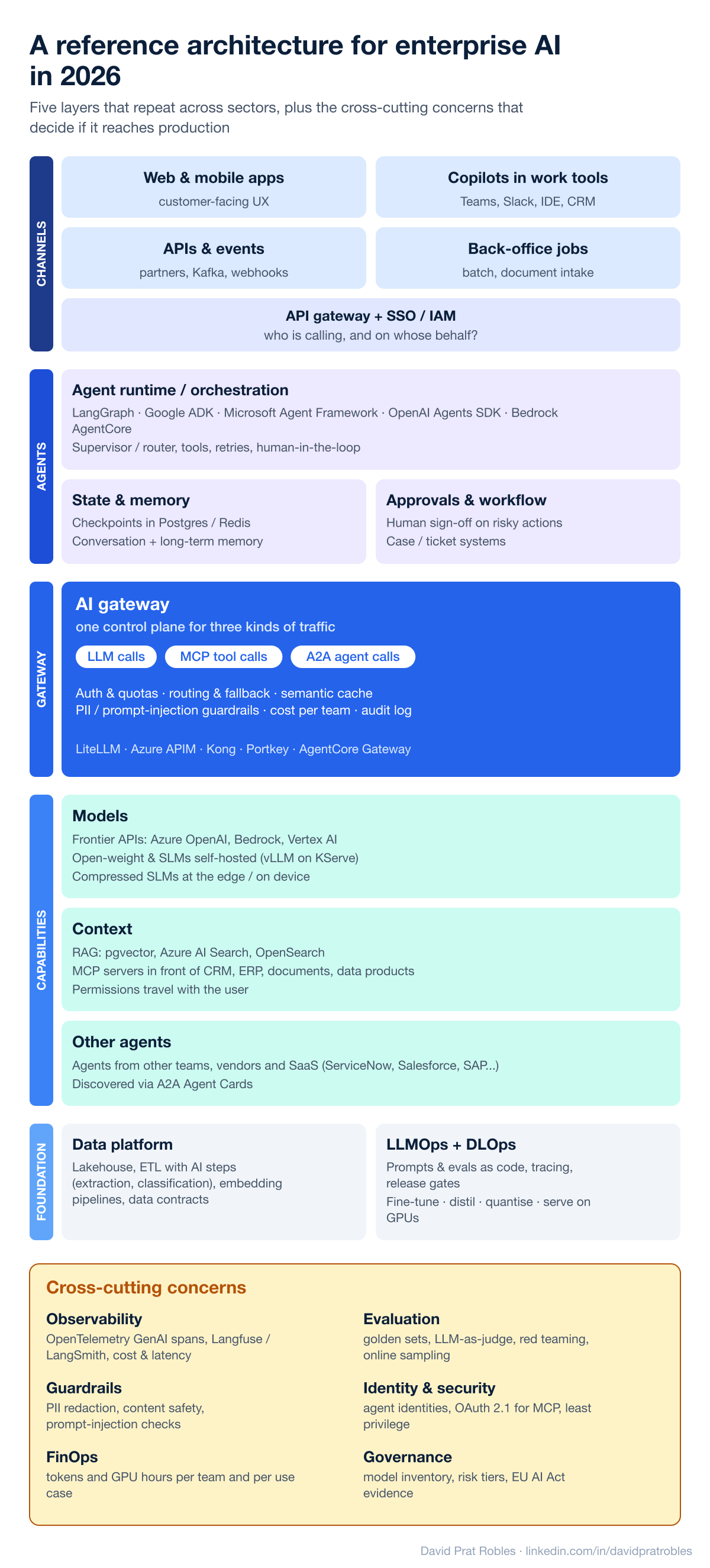
Whether it is a bank, a hospital group or an airline, new AI systems converge on the same five layers:
- Channels and identity. Web and mobile apps, copilots inside Teams, Slack, the IDE or the CRM, APIs and events, and back-office batch jobs. All of them go through the corporate API gateway and SSO first. The key question here is "who is calling, and on whose behalf?", because an agent acting for a user must inherit that user's permissions, not a super-user's.
- Agents and orchestration. An agent runtime with explicit state: LangGraph, Google ADK, Microsoft Agent Framework, the OpenAI Agents SDK or Bedrock AgentCore. Typical building blocks are a supervisor/router that delegates to specialised agents, checkpointed state in Postgres or Redis, and human approval for risky actions.
- The AI gateway. One control plane for every model call, tool call and agent call (more on this below).
- Capabilities. Models (frontier APIs such as Azure OpenAI, Bedrock and Vertex AI, open-weight models and SLMs served on your own GPUs, and compressed models at the edge), context (RAG over pgvector, Azure AI Search or OpenSearch, plus MCP servers in front of CRM, ERP and data products) and other agents reached through A2A.
- Foundation. The data platform (lakehouse, ETL with AI steps, embedding pipelines, data contracts) and the operational disciplines: LLMOps and, when you own models, DLOps.
And a column that cuts across everything: observability, evaluation, guardrails, agent identity, FinOps and governance. In my experience this column, not the model, is what decides whether a pilot becomes a product.
2. MCP is vertical, A2A is horizontal
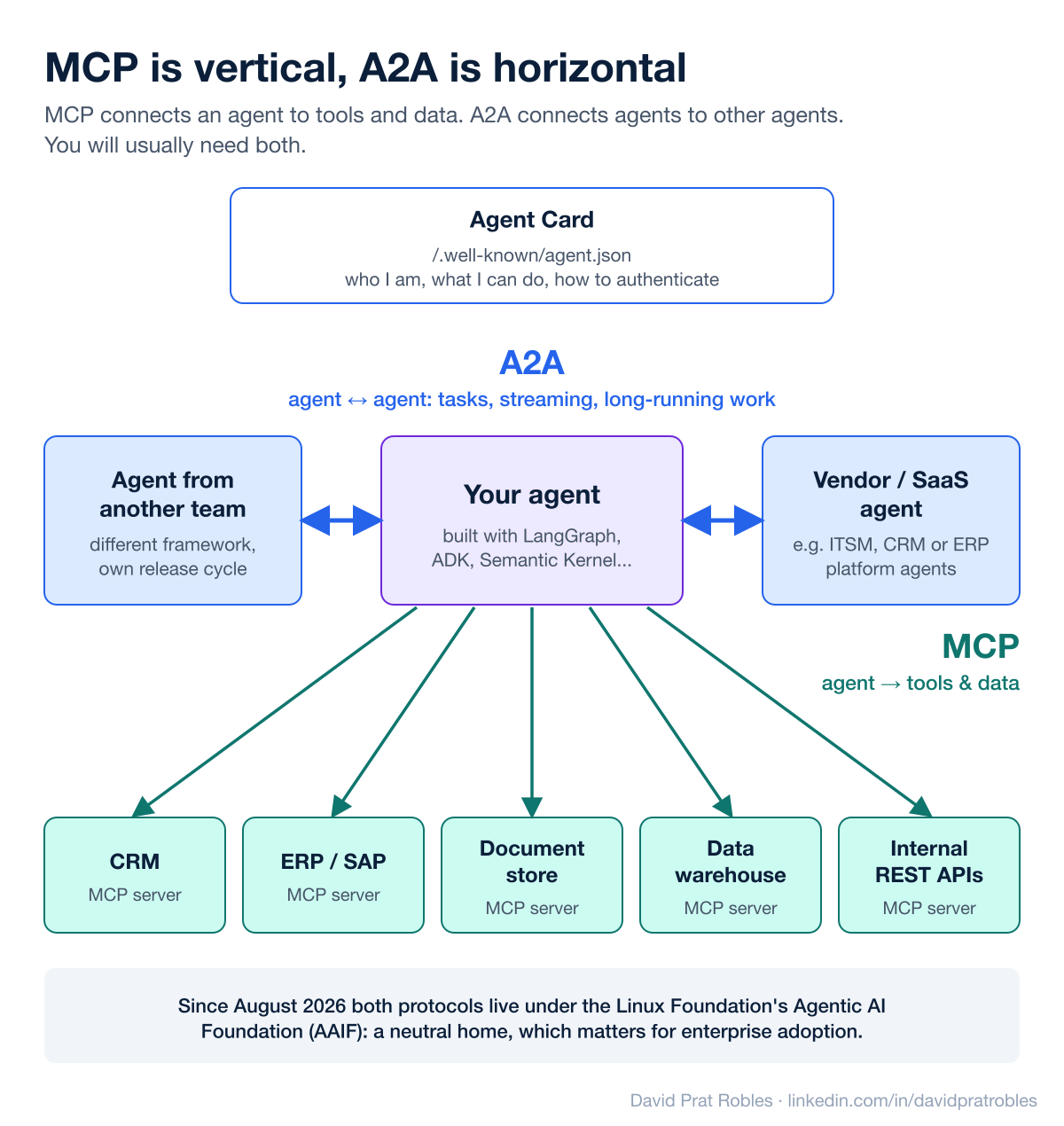
The two protocols people mix up most often solve different problems:
- MCP (Model Context Protocol) connects an agent to tools and data. Each system (CRM, ERP, document store, data warehouse, an internal REST API) is exposed once as an MCP server and can then be reused by any agent or copilot.
- A2A (Agent2Agent) connects an agent to other agents: an agent from another team built with a different framework, or a vendor's agent inside an ITSM, CRM or ERP platform. Each agent publishes an Agent Card describing what it can do and how to authenticate, and work is exchanged as tasks that can stream or run for a long time.
In practice you need both: MCP to give an agent hands, A2A to let agents delegate to each other across team and vendor boundaries. Importantly for enterprise buyers, in August 2026 A2A joined MCP under the Linux Foundation's Agentic AI Foundation, a neutral home that already lists support in major clouds and in platforms such as ServiceNow, Salesforce, Atlassian and SAP, and in frameworks like LangGraph, CrewAI, Pydantic AI, AG2 and BeeAI (A2A blog).
3. The AI gateway: one control plane, three kinds of traffic
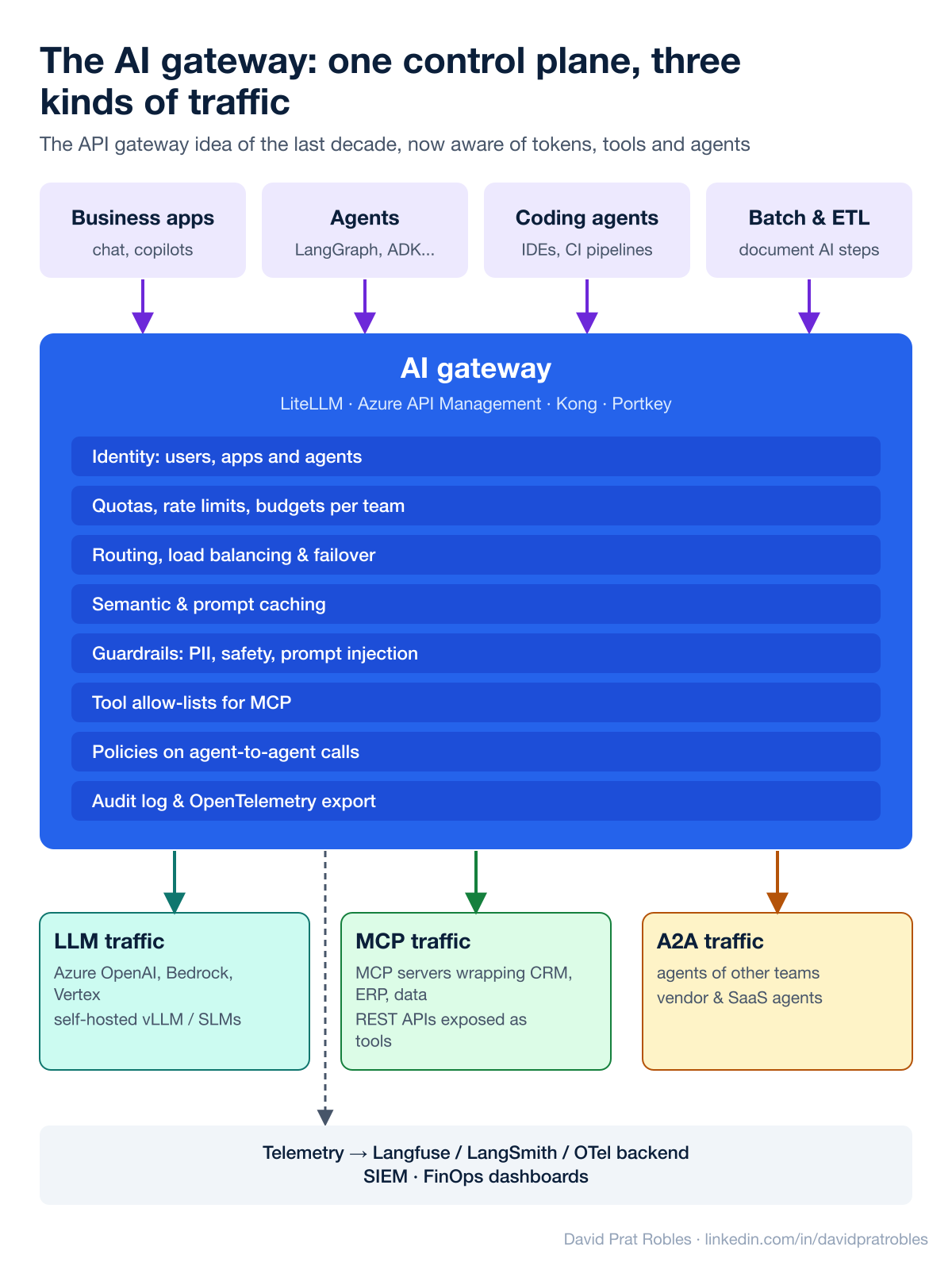
The AI gateway is the API gateway idea of the last decade, made aware of tokens, tools and agents. Everything that calls a model, a tool or another agent goes through it, and it gives you:
- Identity and quotas: users, apps and agents, with rate limits and budgets per team.
- Routing and resilience: load balancing across providers and regions, automatic failover, routing easy requests to smaller models.
- Caching: semantic and prompt caching to cut cost and latency.
- Guardrails: PII redaction, content safety and prompt-injection checks, plus allow-lists of which MCP tools each agent may use.
- Audit and telemetry: every call logged and exported through OpenTelemetry to your tracing, SIEM and FinOps dashboards.
Two of these are worth a closer look, because they are where most of the savings and most of the uptime come from.
- Load balancing with a circuit breaker. The gateway keeps a pool of equivalent backends, for example the same model deployed in two regions, and spreads requests across them in turns, by weight or by priority. Each backend also has a breaker that counts its errors: past a threshold, say a few
429or5xxresponses in a short window, the circuit opens and that backend receives no traffic for a while; then a few test requests decide whether it closes again. The balancer only uses backends whose circuit is closed, so a region that has run out of quota stops receiving requests instead of failing a share of them, and the application notices nothing. With priorities you also get a cost rule: reserved capacity first, pay-as-you-go only when the first group has tripped. In Azure API Management this is a backend pool plus a circuit breaker rule on each backend (docs). - Semantic caching. A normal cache only hits when the request is identical, which almost never happens with free text. A semantic cache turns the prompt into an embedding, looks for a stored prompt that is close enough in meaning, and if it finds one returns the stored answer without calling the model: "what does my home policy cover?" and "what is included in my house insurance?" become the same question. A hit costs one embedding and one vector lookup instead of a full generation, and it does not count against the deployment's tokens-per-minute quota. In API Management it is two policies,
llm-semantic-cache-lookupon the way in andllm-semantic-cache-storeon the way out, backed by Azure Managed Redis with vector search (docs). Three things to get right: the similarity threshold (too loose and it returns the answer to a different question, too strict and it never hits); the partition key (per user or per tenant, so nobody receives an answer generated for someone else); and the scope (generic questions only, never answers that depend on the customer's data or on the moment).
What I see companies actually choose:
- The gateway of their cloud when they are all-in on one provider: Azure API Management's AI gateway capabilities in Microsoft shops, Apigee on Google Cloud, Bedrock AgentCore Gateway and API Gateway on AWS. "AI gateway" is not always a product you buy. In Azure it is a set of capabilities of API Management, not a separate offering (docs): you import the model endpoint, the MCP server or the A2A agent as one more API, attach policies that understand tokens and prompts (token limits, token metrics, semantic cache, content safety), and use backend pools for resilience. The application then calls the gateway's URL with its own credential, and the gateway calls the model with a managed identity, so the model keys never leave it. Which capabilities you get depends on the service tier. On AWS, by contrast, the agent gateway is a different product from API Gateway.
- Their existing API gateway vendor extended to AI. Kong is the clearest example: in April 2026 it added an Agent Gateway to Kong AI Gateway 3.14 to govern LLM, MCP and A2A traffic from one control plane (Kong).
- Open-source, AI-native gateways, mostly in platform teams and scale-ups that want multi-provider freedom: LiteLLM (one OpenAI-compatible endpoint in front of 100+ providers, with virtual keys, budgets, MCP and A2A access), Portkey (MIT-licensed gateway with fallbacks, simple and semantic caching and dozens of guardrails, also offered as SaaS), Envoy AI Gateway (built on Envoy and the Kubernetes Gateway API, renamed Agent Router in 2026) and agentgateway (a single data plane for LLM, MCP and A2A traffic). The last two are now hosted by the Linux Foundation's Agentic AI Foundation, next to MCP and A2A.
- Edge SaaS such as Cloudflare AI Gateway, for lightweight caching, rate limiting and analytics in front of public model APIs.
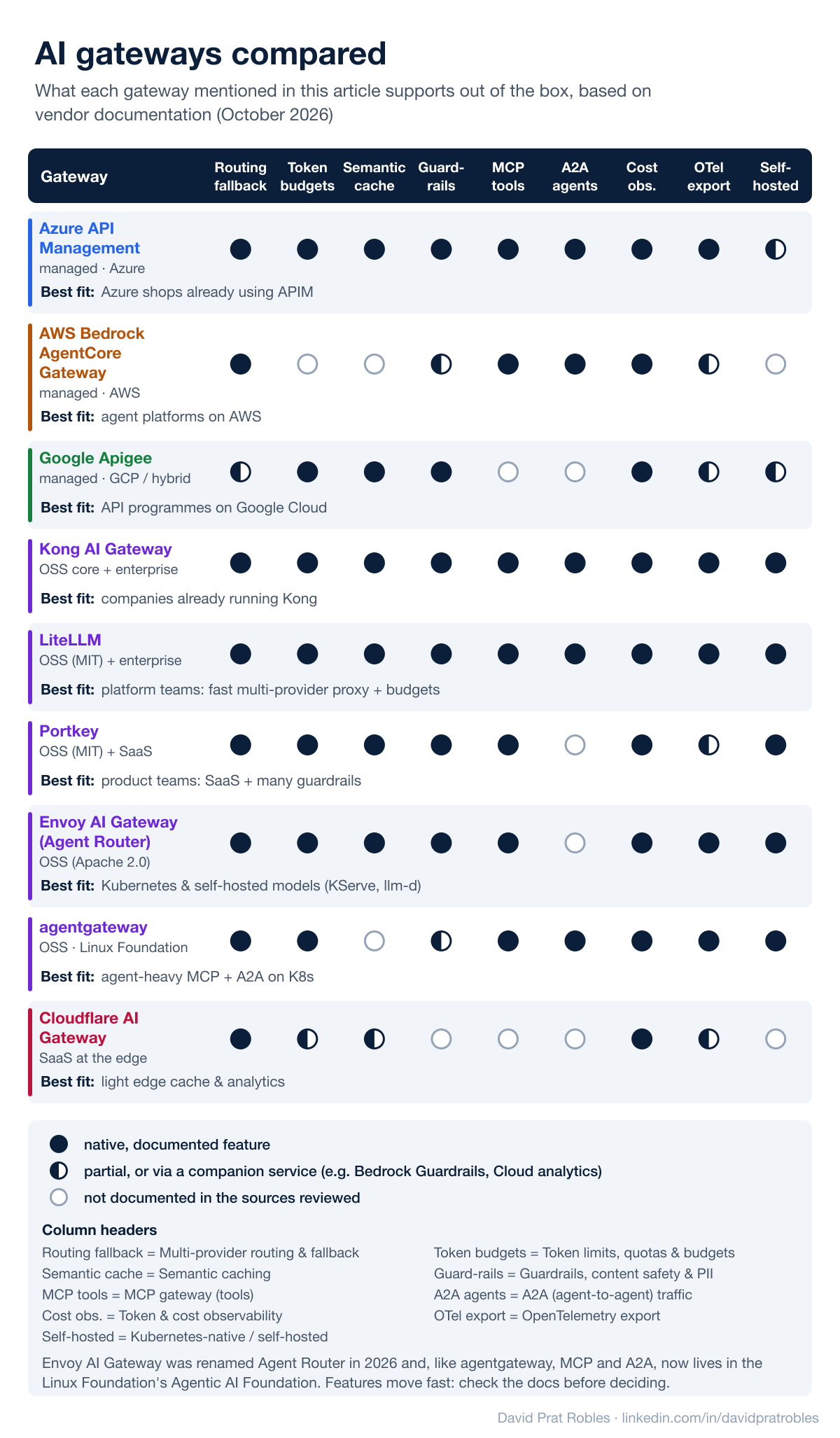
The comparison above summarises what each of them documents today. A few readings of it:
- Feature parity on the basics. Multi-provider routing, token and cost observability and some form of limits are now table stakes everywhere.
- The real differences are MCP and A2A support, how deep the guardrails go, and where the gateway runs: inside one cloud, on your own Kubernetes, or as SaaS.
- Cloud gateways have caught up fast. Azure API Management now governs LLM APIs, MCP servers and A2A agent APIs from the same instance, and AWS Bedrock AgentCore Gateway routes tools, agents and model inference behind one endpoint.
- For self-hosted models on Kubernetes, a Kubernetes-native gateway (Envoy AI Gateway, agentgateway or Kong) in front of KServe and llm-d gives one entry point for both API-based and self-hosted models.
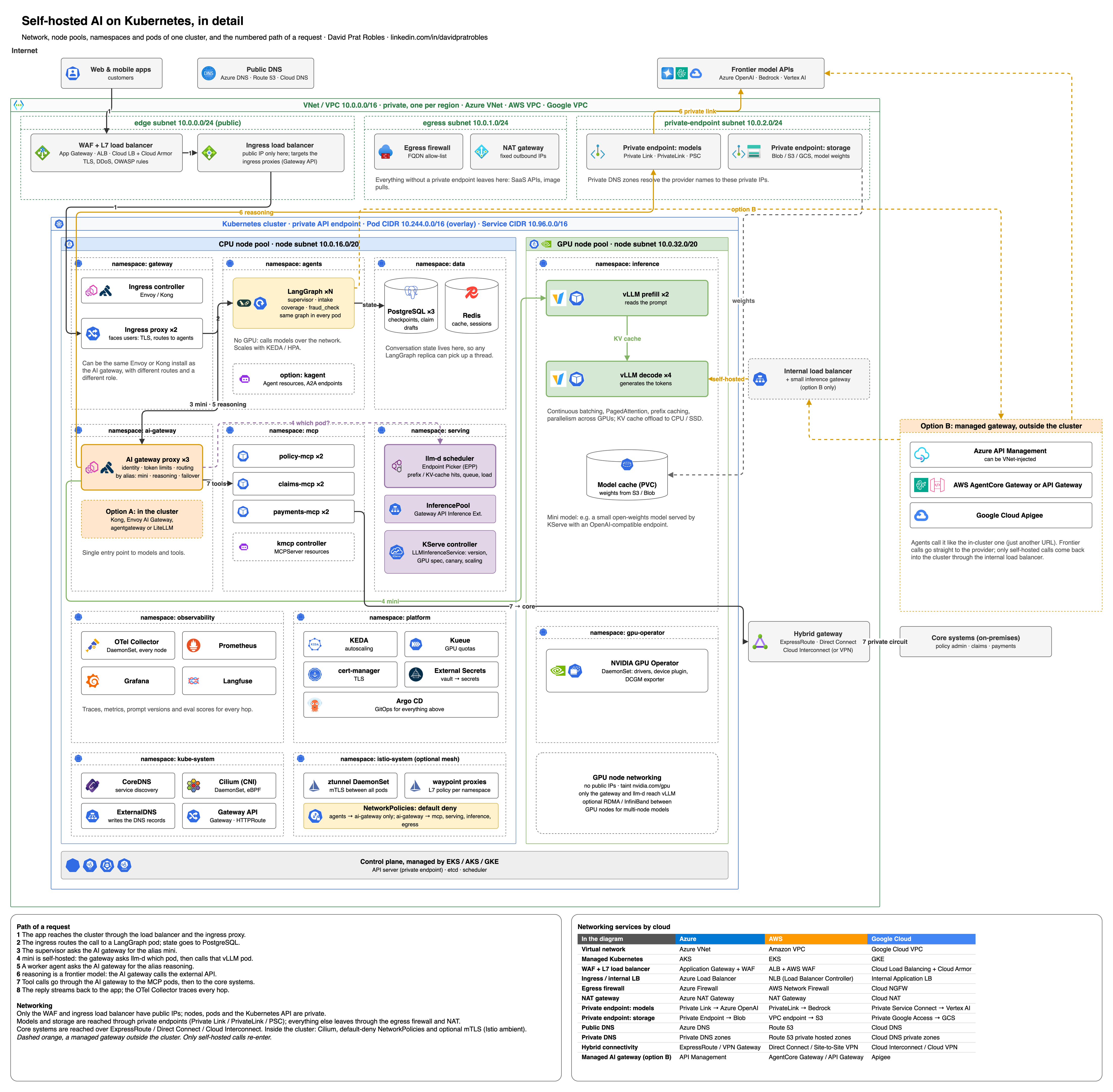
Zoom in: draw.io viewer · full-resolution PNG · editable .drawio file
Show the original LinkedIn version of this diagram
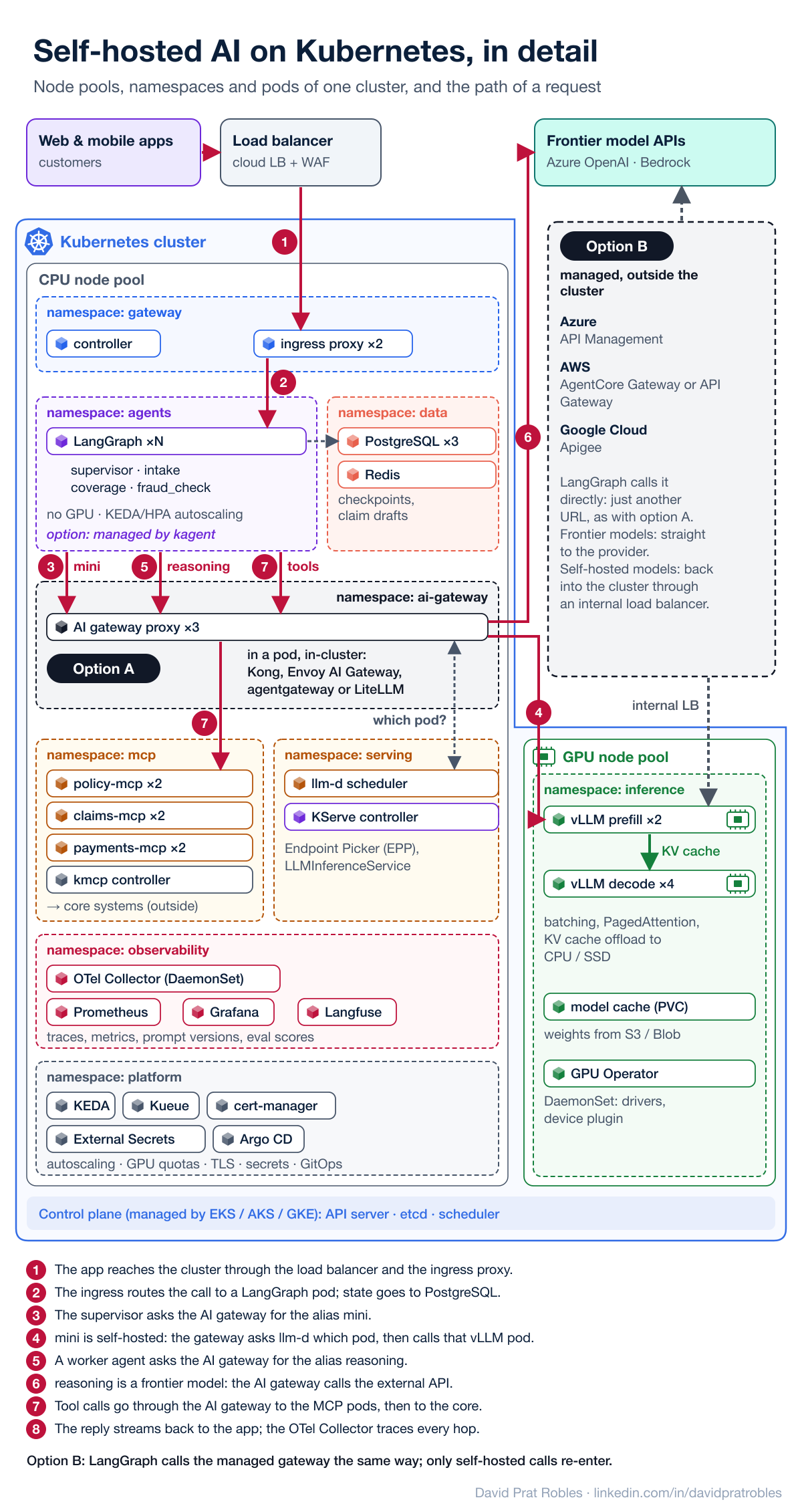
How that self-hosted stack splits the work, following the numbered path in the diagram:
- The agent service (for example a LangGraph supervisor and its worker agents) is an ordinary Deployment on CPU nodes: every pod runs the same graph, the conversation state lives in PostgreSQL so any replica can pick it up, and it needs no GPU because it calls the models over the network (steps 1–2). The ingress in front of it and the AI gateway can be the same Envoy or Kong installation with different routes, but they play different roles: one faces users, the other faces models and tools.
- The AI gateway (Envoy AI Gateway, agentgateway or Kong) is the single entry point to models and tools. It checks identity and token limits, and routes by model name: the alias
minican be a small self-hosted model that stays in the cluster (steps 3–4), whilereasoninggoes to a frontier model on Azure OpenAI, Bedrock or Vertex AI (steps 5–6), and the gateway can fail over from one to the other. Tool calls take the same road to the MCP server pods (step 7). The gateway itself can live in two places. Option A: inside the cluster, as pods (Kong, Envoy AI Gateway, agentgateway or LiteLLM), close to the models and fully under your control. Option B: outside the cluster, as the cloud's managed gateway (Azure API Management, AWS AgentCore Gateway or API Gateway, Google Apigee); LangGraph calls it exactly as it would call the in-cluster one (it is just another URL), frontier calls go straight to the provider, and only calls to self-hosted models come back into the cluster, through an internal load balancer and a small in-cluster inference gateway that asks llm-d which pod to use. Option B is natural when the company already runs that API platform; option A when the cluster must be portable or run on-premises. - The llm-d scheduler decides which pod serves each request, but it is not a hop on the request's path: the gateway asks it which pod to use and then sends the call straight to that vLLM pod. It plugs into the gateway through the Kubernetes Gateway API Inference Extension (an InferencePool of model servers plus an Endpoint Picker) and scores pods by prefix and KV-cache hits, queue depth and load, so a long conversation lands where its prompt is already cached. It can also split work between prefill and decode pods.
- vLLM is the inference engine inside each pod: continuous batching, PagedAttention, prefix caching and parallelism across GPUs. With llm-d, prefill pods read the prompt, decode pods generate the tokens, and the KV cache can be offloaded to CPU or SSD.
- KServe is the control plane around them. Its LLMInferenceService deploys the model with its version and GPU spec, exposes an OpenAI-compatible endpoint, scales the pods (for example with KEDA on the scheduler's metrics), rolls out new revisions as canaries and wires the InferencePool and scheduler for you.
- Kubernetes splits the work into a CPU node pool and a GPU node pool, with one namespace per concern. Next to the agents, gateways and models run the usual supporting pods: PostgreSQL and Redis for agent state; an OpenTelemetry Collector on every node, Prometheus, Grafana and Langfuse for observability; KEDA, Kueue, cert-manager, External Secrets and Argo CD for autoscaling, GPU quotas, certificates, secrets and GitOps; and the NVIDIA GPU Operator on the GPU nodes. The control plane itself is managed by the cloud provider.
Notes on the agent layer: one graph or many, A2A, kmcp, kagent and Agent Stack
The diagram draws the simplest setup: one LangGraph service and three MCP servers as ordinary workloads. Seven notes on the variations.
- One graph or one service per agent. You can keep every agent in a single LangGraph application, with the supervisor and the workers as nodes or subgraphs that call each other in-process and share state. Or you can give each agent its own graph, its own pods and its own release cycle, and let them talk over the network with A2A. The first is simpler: one checkpointer, one trace, one deployment. The second pays off when agents belong to different teams, use different runtimes or are reused by several consumers. Most companies mix them: one graph per team, and A2A only at the border with other teams or vendors. Either way someone still has to play supervisor: A2A is the transport, it does not decide whom to call.
- Does LangGraph speak A2A on its own? The library does not: a compiled graph is a Python object with no network server. The LangGraph Agent Server (LangSmith Deployment, which can also be self-hosted) does: it serves each assistant at
/a2a/{assistant_id}and publishes its Agent Card (docs). That leaves four ways to put a graph behind an A2A endpoint: (1) run it on the Agent Server; (2) host it in your own container and add the A2A server yourself with the A2A SDK; (3) run it under kagent; or (4) wrap it with the Agent Stack SDK. The last two are described below. For a single supervisor graph, the first two are enough. In all four, speaking A2A is the agent's job, while publishing and governing it is the gateway's: Azure API Management, for example, imports an agent from its Agent Card URL, republishes the card under its own hostname with its own security requirements, and applies policies to every call (docs). - kmcp (repo) is a CLI and Kubernetes controller for building and deploying MCP servers. Each server becomes an
MCPServerresource, and a transport adapter in front of it handles HTTP, WebSocket and SSE. In the diagram it is the kmcp controller in themcpnamespace; the path of the request does not change. - kagent (repo), a CNCF project, does the same for agents: each one is an
Agentresource, with models and MCP tools defined as resources too, OpenTelemetry tracing, a UI and durable A2A tasks stored in PostgreSQL. A LangGraph graph runs under it through thekagent-langgraphpackage, which wraps the graph as an A2A server. The price: callers no longer reach the pods directly but through kagent's A2A gateway, the agent's state lives in two places (kagent's database and the LangGraph checkpointer), and the project is young. As of October 2026 its API isv1alpha3, and its docs list declarative agent-to-agent calls over A2A and multi-replica gateway coordination as not implemented, so a graph that calls another agent still does it with its own A2A client. With an AI gateway in front you do not need it for A2A itself; I would use it when many agents on mixed runtimes must be run and managed the same way, not for a single supervisor graph. - Agent Stack (repo), a Linux Foundation project that started at IBM as the BeeAI platform, fills the same box as kagent in a different style. Instead of Kubernetes resources it gives you an SDK that wraps an agent from any framework as an A2A server, plus a web UI, multi-tenancy and platform services the agent can ask for at runtime: an LLM proxy, embeddings, file storage and a vector store. It is installed with a Helm chart, you give it the container image of each agent, and it runs and scales them in the cluster, down to zero when idle. It does not serve models, so it sits next to KServe, not in its place.
- kagent or Agent Stack, not both. Each one wants to own the agent's lifecycle, its registry and its state, so running the same agents under both gives you two control planes for one layer. Choose kagent if the platform team wants everything declared as Kubernetes resources and delivered with GitOps; choose Agent Stack if product teams want an SDK, a UI and ready-made services. They only meet at the border: Agent Stack can register an agent that already runs somewhere else from its URL, in which case it reads the Agent Card and proxies the calls without managing the pods (docs). The same rule applies to both: worth it when many teams publish agents, not for one graph.
- BeeAI Framework is not Agent Stack. The names get mixed up because both come from the same project. Agent Stack is the platform that runs agents; BeeAI Framework (repo) is a library for writing them, an alternative to LangGraph, in Python and TypeScript. Its main agent class is the
RequirementAgent: a model, a list of tools and a list of requirements, which are rules enforced in code about when each tool may or must be used (docs). AConditionalRequirementcan force a tool at a given step, allow it only after another one, or set a minimum and a maximum number of calls. A rule always points at a tool, and a tool can be a native function, an MCP tool or another agent wrapped in aHandoffTool, local or remote over A2A (A2AAgent). So "router agent" is a role, not a class: in BeeAI the supervisor is aRequirementAgentwhose tools are handoffs to the specialists, and a specialist is anotherRequirementAgentwhose tools are MCP tools. The rules narrow what the model may choose at each step; inside those limits the model still decides. It is the same idea as the edges of the LangGraph graph in section 6: the order is fixed in code, not in the prompt. A2A is what lets the two frameworks mix, so a BeeAI agent and a LangGraph agent can sit behind the same gateway.
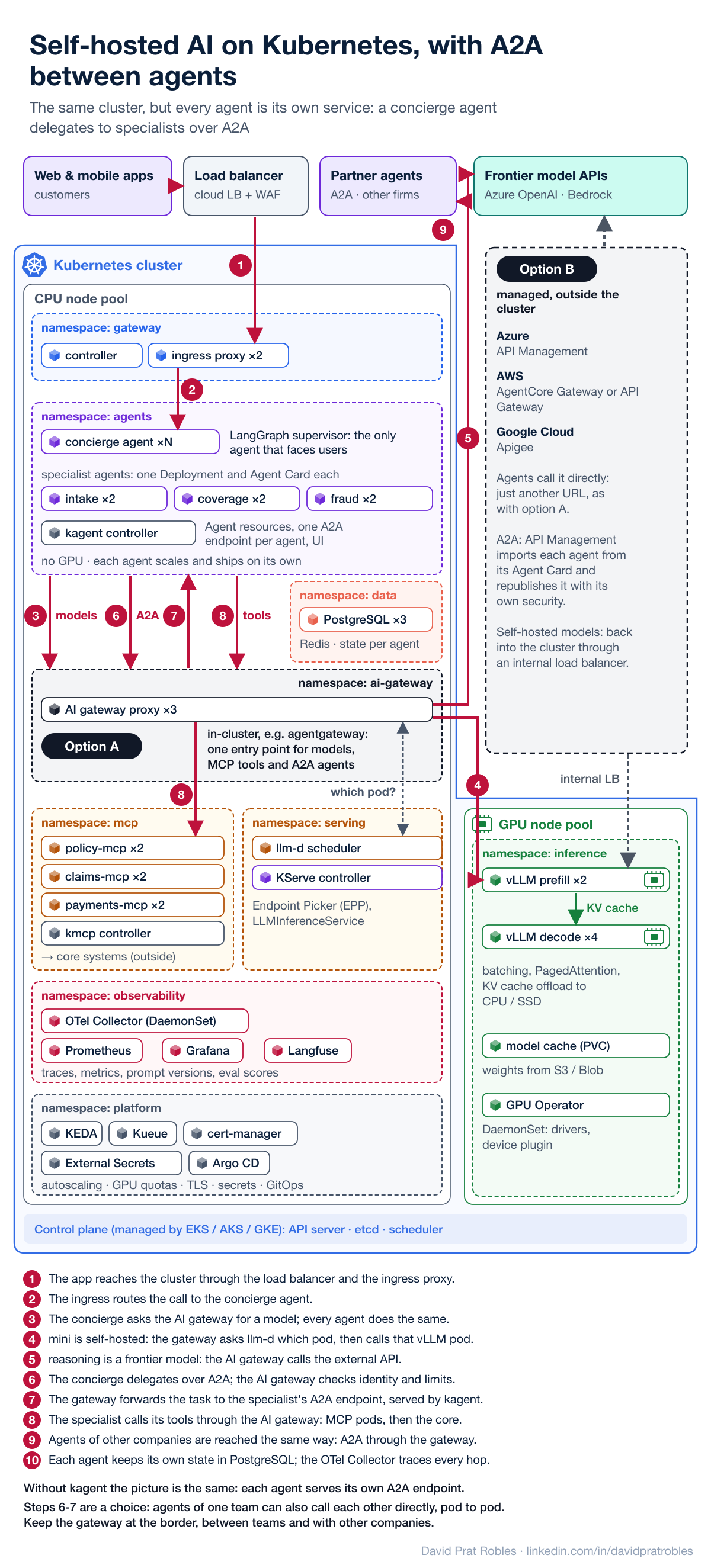
The same cluster with A2A between agents. The second diagram shows what changes when each agent becomes its own service. A concierge agent is the only one that faces users: it understands the request and delegates to the specialist agents (intake, coverage, fraud), each with its own Deployment, its own Agent Card and its own release cycle. The delegation goes through the AI gateway, like every other call that leaves an agent, so identity, limits and traces are applied in one place; agents of other companies are reached the same way. That route is a choice, not a rule of the protocol: A2A is plain HTTP, so agents of the same team in the same cluster can also call each other directly, service to service, with mTLS and network policies, and save a hop. The gateway is what you should not skip at the border, between teams or with other companies, where you need to control who calls whom. Here kagent manages the agents and serves their A2A endpoints; without it, each agent serves its own. Everything below the gateway (MCP servers, llm-d, KServe, vLLM) stays the same. What you pay is more moving parts: several deployments, state per agent, and a network hop where there was a function call.
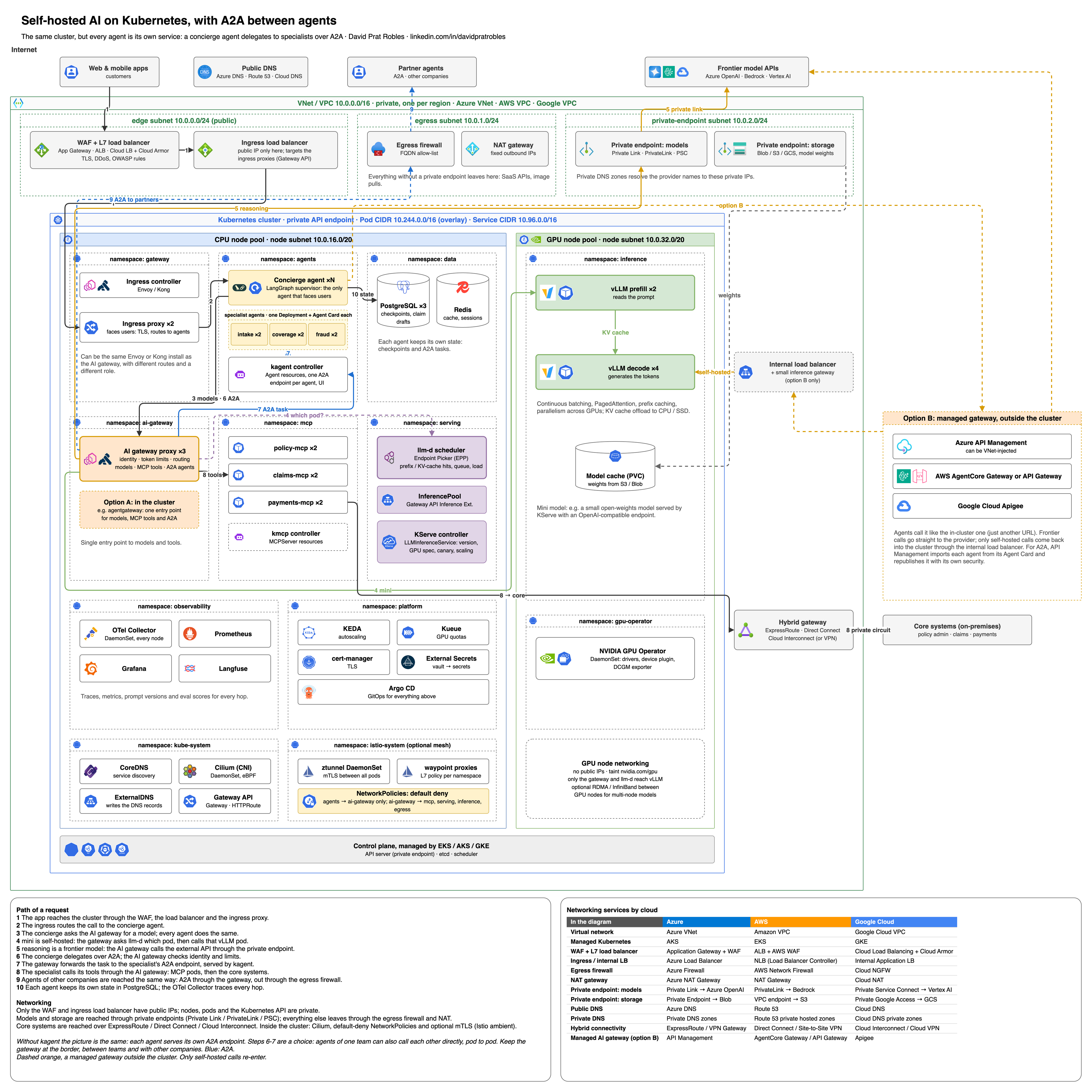
Zoom in: draw.io viewer · full-resolution PNG · editable .drawio file
Show the original LinkedIn version of this diagram
Routing easy requests to small models
How do easy requests end up on small models? In three ways, often combined:
- The application says so (the most common in enterprises): each step of the application asks for an alias such as
miniorreasoning, as the LangGraph supervisor of the worked example in section 6 does. Predictable, cheap and auditable. - The gateway decides with rules or a small triage model: LiteLLM's complexity router scores each prompt (length, code, reasoning markers, or a small classifier model) and sends it to a tier; Kong AI Proxy Advanced has a semantic routing algorithm.
- A managed, trained router behaves like one more model: Microsoft Foundry's model router picks the underlying model per prompt in Balanced, Cost or Quality mode, and Amazon Bedrock Intelligent Prompt Routing chooses between two models of the same family by predicted response quality.
Use the first as the default, and the second or third for open, heterogeneous traffic such as an employee chat, after checking with your evals that hard questions are not being sent to the small model.
A very common pairing in new projects: LangGraph for orchestration + LiteLLM or Azure API Management as the gateway + Langfuse or LangSmith for tracing and evaluation. LangGraph simply points its model client to the gateway's endpoint, so swapping providers or adding guardrails does not touch the agent code. Section 6 shows, on a concrete example, how the LangGraph supervisor and the gateway split the work.
4. Same building blocks, different emphasis by sector
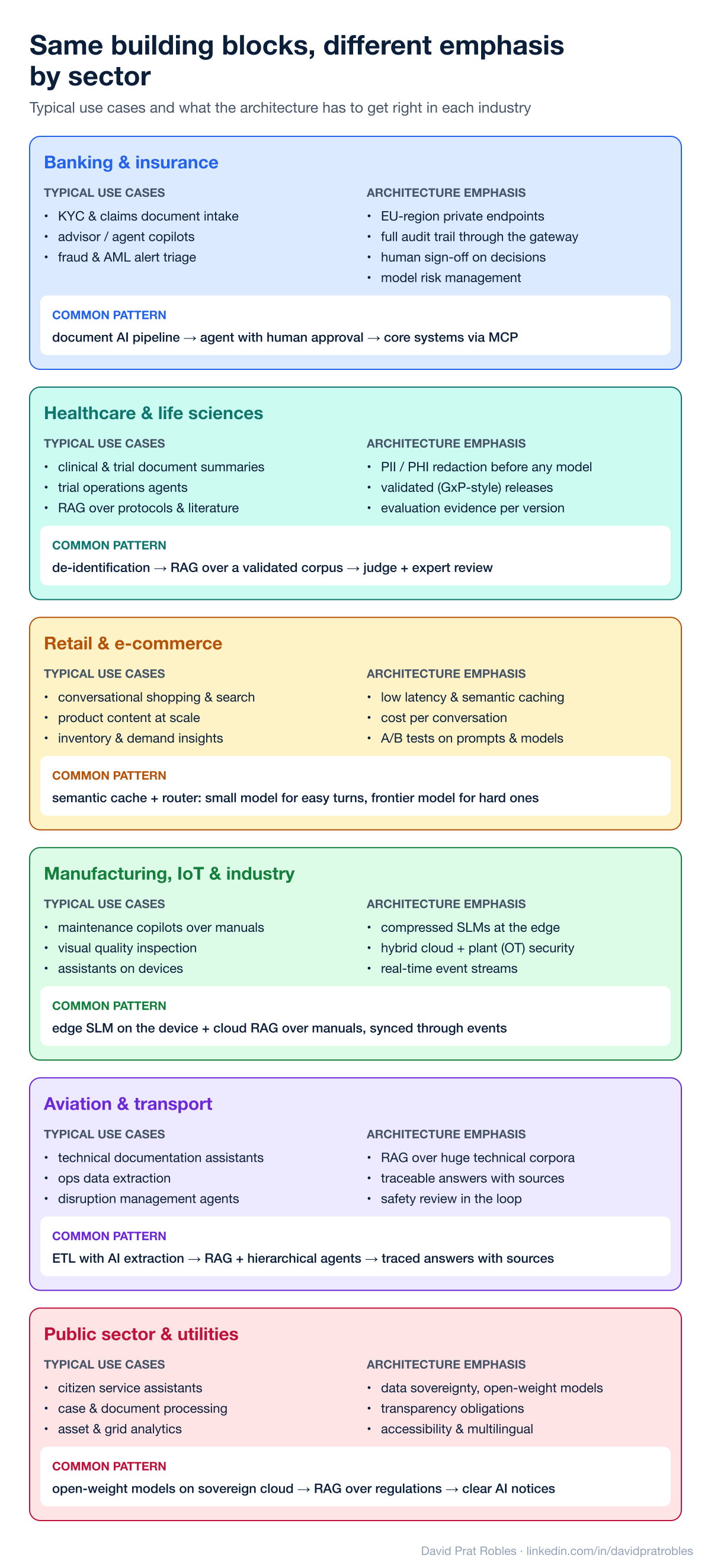
The layers are the same everywhere; what changes is which part has to be bullet-proof:
- Banking and insurance: document intake (KYC, claims), advisor copilots and fraud or AML alert triage. The emphasis is on EU-region private endpoints, a complete audit trail through the gateway, human sign-off on decisions and model risk management. Common pattern: document AI pipeline → agent with human approval → core systems via MCP.
- Healthcare and life sciences: clinical and trial document summaries, trial-operations agents and RAG over protocols and literature. PII/PHI redaction happens before any model sees the data, and every release carries evaluation evidence, in the spirit of validated (GxP-style) software. Common pattern: de-identification → RAG over a validated corpus → automated judge + expert review.
- Retail and e-commerce: conversational shopping and search, product content at scale and demand insights. Latency and cost per conversation dominate, so semantic caching and model routing matter more than anywhere else. Common pattern: a router sends easy turns to a small model and hard ones to a frontier model.
- Manufacturing, IoT and industry: maintenance copilots over manuals, visual quality inspection and assistants running on devices. Here compressed SLMs at the edge, hybrid cloud-plus-plant security and real-time event streams are the defining features. Common pattern: an SLM on the device plus cloud RAG over manuals, synced through events.
- Aviation and transport: technical documentation assistants, operational data extraction and disruption-management agents. Answers must be traceable to their sources and safety-relevant outputs reviewed by humans. Common pattern: ETL with AI extraction → RAG + hierarchical agents → traced answers with citations. This is very close to what we built at IAG.
- Public sector and utilities: citizen-service assistants, case and document processing and asset analytics, with strong requirements on data sovereignty (often open-weight models on sovereign cloud), transparency and accessibility.
5. New projects vs. existing systems
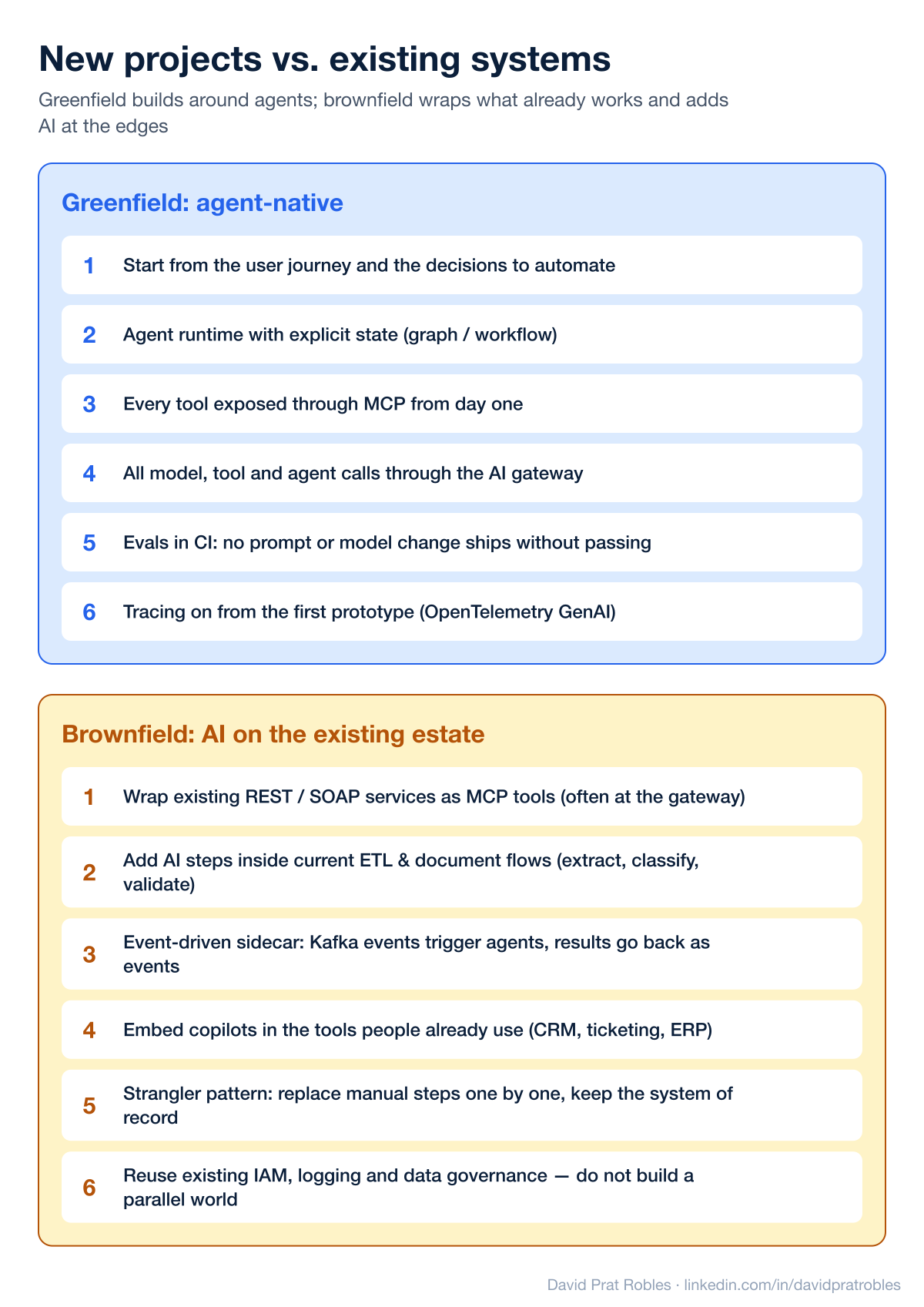
Most of the AI work I see is not greenfield. The patterns differ:
Greenfield (agent-native). Start from the user journey and the decisions to automate; build on an agent runtime with explicit state; expose every tool through MCP from day one; send all model, tool and agent calls through the gateway; make evals part of CI so no prompt or model change ships without passing; and switch tracing on from the very first prototype.
Brownfield (AI on the existing estate). Wrap existing REST or SOAP services as MCP tools (several gateways can now generate MCP servers from APIs they already manage); add AI steps inside current ETL and document flows to extract, classify and validate; use an event-driven sidecar where Kafka events trigger agents and results flow back as events; embed copilots in the tools people already use; and replace manual steps one by one (the strangler pattern) while keeping the system of record. Above all, reuse the existing IAM, logging and data governance. A parallel "AI world" with its own identities and logs is the fastest way to fail an audit.
6. Worked example: an AI claims assistant for an insurer on Azure
Patterns are easier to judge on a concrete case, so here is one end to end. Imagine a mid-sized European insurer (motor and home) that already runs on Microsoft and Azure. It wants an assistant inside its mobile app and its website that can do two things: let a customer report a claim (first notice of loss), and answer coverage questions about the customer's own policy. The constraints are typical for the sector: data stays in the EU, the core policy and claims systems must not be rewritten, every decision must be auditable, a human approves anything that pays out money, and cost per conversation has to be visible.
The design is drawn twice, once per use case: the same architecture in both diagrams, with the numbered path of the request and the components that journey does not touch greyed out. The first use case touches almost every component, so it doubles as the full picture.
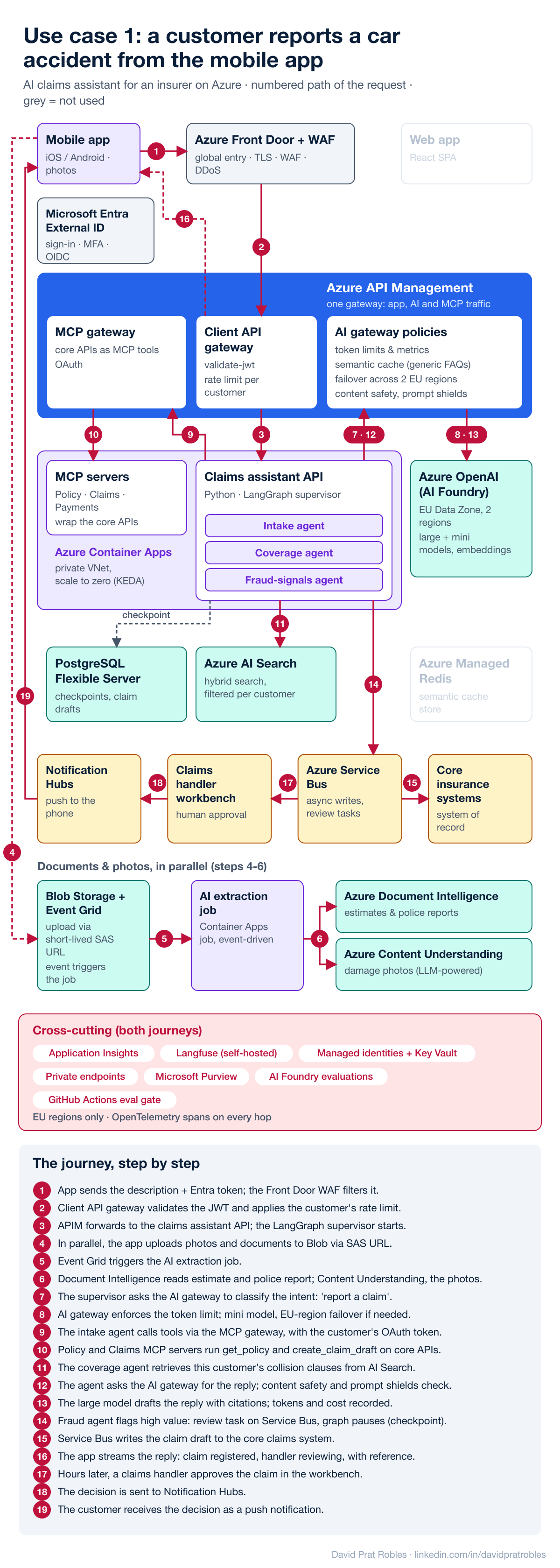
The technology choices, and why
- Microsoft Entra External ID: customer sign-in with MFA, issuing the OIDC tokens that every downstream hop validates. Why: customer identity is solved once, and agents always act with the customer's identity, never with a technical super-user.
- Azure Front Door + WAF: the single global entry point for web and mobile, with TLS, WAF rules and DDoS protection. Why: the AI endpoints are as exposed as any public API and get the same protection. It is often confused with API Management, but they do different jobs. Front Door is the global edge, the role CloudFront and AWS WAF play on AWS: it filters attacks and picks a healthy region without knowing who the caller is. API Management is the API gateway, the role of Amazon API Gateway: it knows which consumer calls which operation and applies policies to that. They are used together, in that order.
- Azure API Management, one instance with three roles. As the client API gateway it validates the JWT, applies rate limits per customer and versions the APIs for the apps. As the AI gateway it enforces token limits and emits token metrics per product, serves a semantic cache backed by Azure Managed Redis (only for generic questions, never for personalised answers), load-balances with circuit breakers across Azure OpenAI deployments in two EU regions, and applies content safety with prompt shields on input and output. As the MCP gateway it exposes and governs the core REST APIs as MCP tools with OAuth. Why APIM and not, say, LiteLLM? This insurer already runs APIM for its APIs, so one policy engine, one audit log and one platform team cover app, AI and tool traffic. For a multi-cloud, developer-led team LiteLLM would be an equally valid choice.
- Azure Container Apps in a private VNet: runs the Python claims assistant API, the MCP servers and an event-driven extraction job. Why: serverless containers that scale to zero at night and scale out on events with KEDA, without running a Kubernetes cluster. AKS is the alternative when you already operate Kubernetes at scale.
- LangGraph: a supervisor routes each request to an intake agent (collects first-notice-of-loss data), a coverage agent (RAG over policy wordings) or a fraud-signals agent (rules and scores; it flags, it never decides alone). Why: an explicit state machine with checkpoints and human-in-the-loop interrupts, which is essential when a claim pauses for hours waiting for a handler.
- Azure Database for PostgreSQL (Flexible Server): LangGraph checkpoints and claim drafts. Why: mature, cheap, well known by the team, and pgvector is there if needed later.
- Azure OpenAI in Azure AI Foundry: EU Data Zone deployments in two regions; a large model to reason and draft, a mini model to classify intents, and an embedding model for search. Why: data residency, the existing enterprise agreement, and the gateway hides which deployment answers each call.
- Azure AI Search: hybrid (keyword + vector) search with semantic ranking over policy wordings and general conditions, filtered so each customer only retrieves their own policy version. Why: security trimming, ranking and document indexers out of the box, instead of building them on top of a plain vector store.
- Blob Storage + Event Grid + Azure Document Intelligence + Azure Content Understanding: photos and documents (repair estimates, police reports) go directly to storage through short-lived SAS URLs, and an event triggers the extraction job. Document Intelligence (formerly Form Recognizer) extracts fields reliably from the documents; Content Understanding, its LLM-powered sibling for unstructured and multimodal content, describes the damage visible in the photos. Why: large files never travel through the chat API, extraction is asynchronous and retryable, and each kind of content goes to the service built for it.
- MCP servers (Policy, Claims, Payments): thin wrappers over the existing core APIs. Why: the core stays untouched, and the tools are reusable by any future agent or copilot. The payments tool is read-only for agents; payouts only happen after human approval.
- Azure Service Bus: reliable asynchronous writes to the core systems and review tasks for claims handlers. Why: the AI side never blocks on, or overloads, the system of record.
- Claims handler workbench + Azure Notification Hubs: humans approve high-value or flagged claims, and the customer receives the decision as a push notification.
- Cross-cutting: Application Insights with OpenTelemetry across every hop, self-hosted Langfuse for LLM traces, prompt versions and eval scores, managed identities and Key Vault (no secrets in code), private endpoints for models and data, Microsoft Purview for data classification, and Azure AI Foundry evaluations wired into a GitHub Actions release gate.
Following one interaction through the system
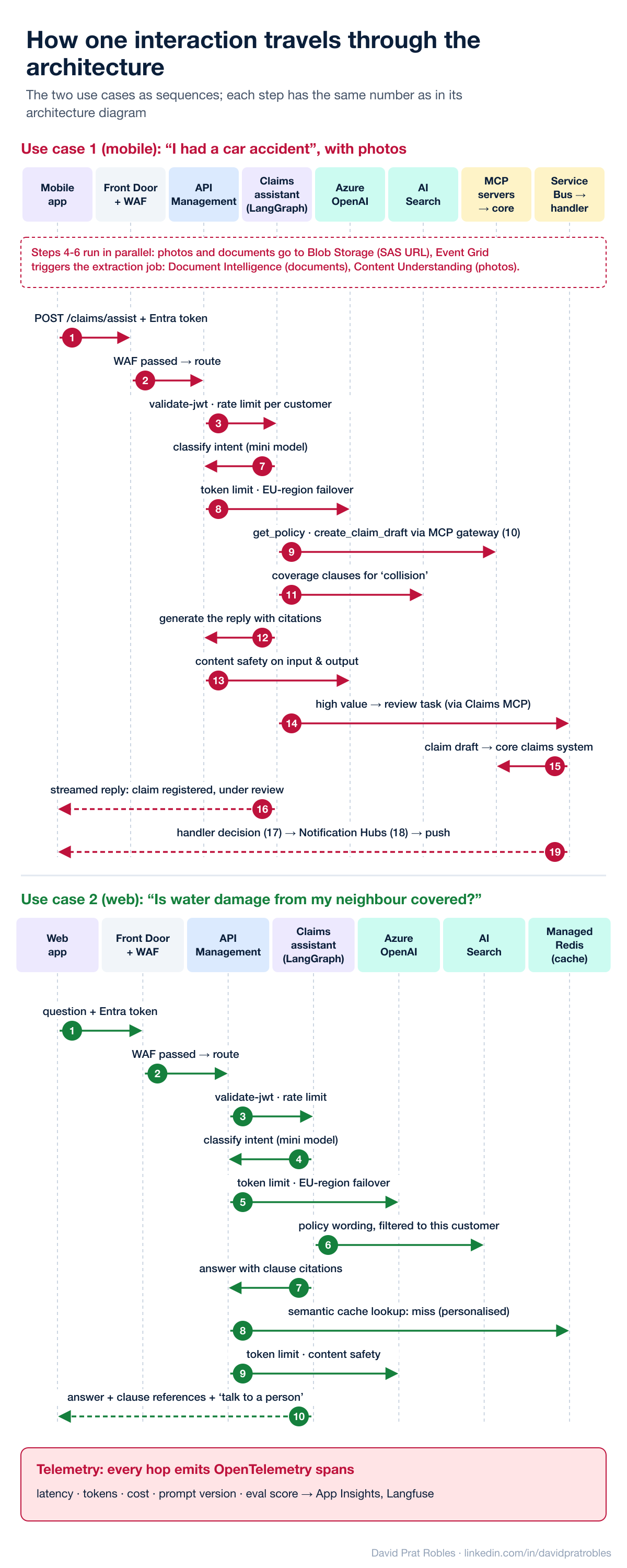
Use case 1, mobile: "I had a car accident." The customer opens the app, describes what happened and attaches photos. The step numbers match the first diagram.
- 1–3: the request travels with the customer's Entra token through Front Door and the WAF to APIM, which validates the token and applies the customer's rate limit before forwarding it to the claims assistant.
- 4–6, in parallel: the photos and documents go straight to Blob Storage with a SAS URL; Event Grid triggers the extraction job, which reads the repair estimate and police report with Document Intelligence, analyses the damage photos with Content Understanding and stores structured damage data.
- 7–8: the LangGraph supervisor asks a mini model, through the APIM AI gateway, to classify the intent. The gateway enforces the token budget and fails over to the second EU region if the first is saturated.
- 9–10: the intake agent calls
get_policyandcreate_claim_draftas MCP tools, governed by the APIM MCP gateway. - 11: the coverage agent retrieves the relevant collision clauses from AI Search.
- 12–13: the reply is generated with citations by the large model; content safety checks both the prompt and the answer.
- 14–15: the fraud-signals agent sees a high-value claim and, through the Claims MCP server, posts a review task on Service Bus; the graph pauses with its state checkpointed in PostgreSQL, and the draft is written to the core claims system.
- 16: the app streams back "your claim is registered and a handler is reviewing it", with the claim reference.
- 17–19: later, the handler approves the claim in the workbench, and Notification Hubs pushes the decision to the phone.
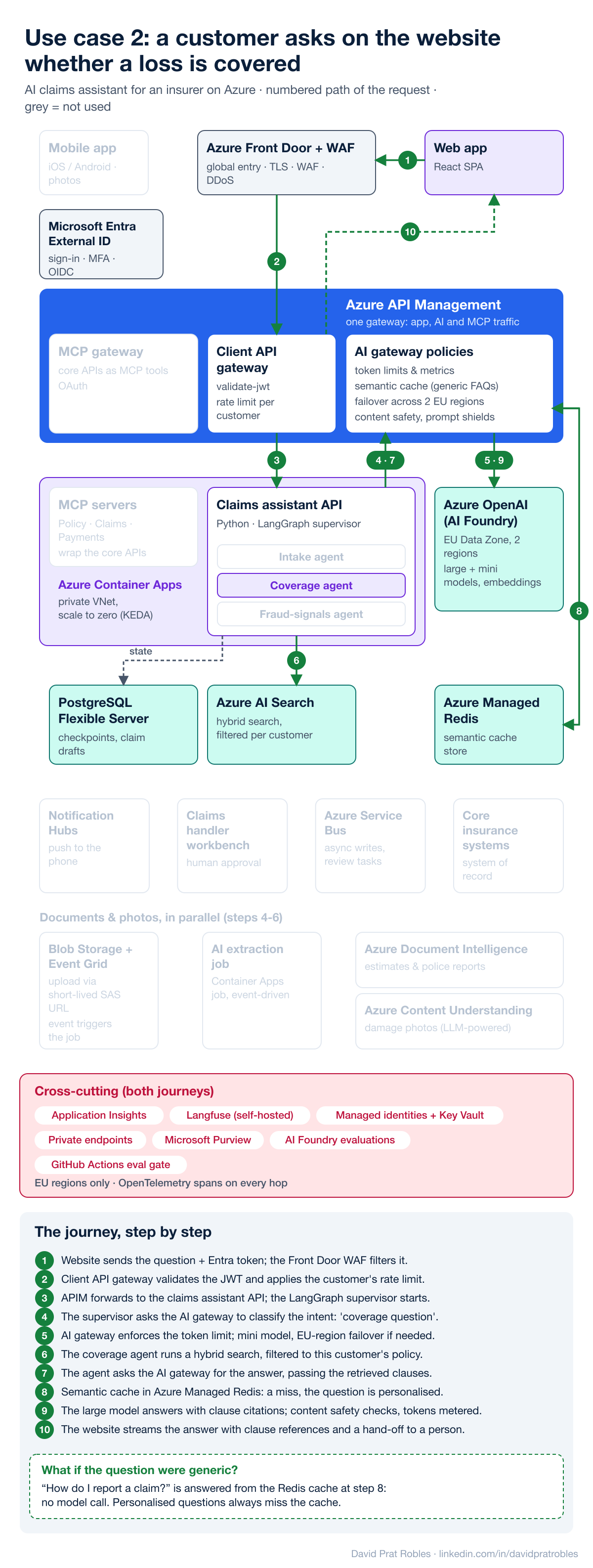
Use case 2, web: "Is water damage from my neighbour covered?" A different customer asks on the website. The step numbers match the second diagram, and the greyed-out boxes show how much of the platform this journey never touches: no MCP tools, no documents, no Service Bus, no core-system writes.
- 1–3: same entry path: Front Door, APIM token validation and rate limiting.
- 4–5: the supervisor classifies the intent with the mini model, through the AI gateway.
- 6: the coverage agent searches only within this customer's policy wording.
- 7–9: the answer is generated through the AI gateway. The semantic cache is checked but misses, because the question is personalised; a generic question such as "how do I report a claim?" would have been answered from the cache at a fraction of the cost.
- 10: the answer cites the exact clauses and offers a hand-off to a person.
Every hop emits OpenTelemetry spans with latency, tokens, cost, prompt version and evaluation score, so one trace shows the whole journey, from the tap on the phone to the core system and back.
Inside the claims assistant: who routes what
The assistant has two "routers": the LangGraph supervisor inside the Claims assistant API, and the AI gateway policies in API Management.
A question I get often: if the supervisor already decides which agent and which model handles each request, why does the design need an AI gateway as well? Because they route at different levels. The supervisor decides what work to do and who does it; the gateway decides how each model or tool call leaves the building, and under which rules. They do not replace each other; they stack.
The LangGraph supervisor is application logic, Python code inside your service:
- It routes tasks to agents, not requests to providers: "I had an accident" goes to the intake agent (step 7 of use case 1), "is water damage covered?" to the coverage agent.
- It picks the model of each node in code: the supervisor asks for a small model to classify (steps 7–8), the agents for a large one to reason and write (steps 12–13). That is a design decision, not an operational policy.
- It owns the conversation state: checkpoints, retries, which tool comes next, and pausing for a human.
- It knows the business: what a claim is, which data is missing, when a person must approve.
- What it cannot do well is shared limits. LangChain's client-side rate limiter counts requests per second inside one process; it does not know there are twenty replicas, five other applications and a monthly token budget per department. Keys, failover between regions, caching, corporate guardrails and one audit log would all have to be rebuilt in every application.
The AI gateway is shared infrastructure, a proxy that every application and agent calls:
- Identity and global quotas: tokens per minute and budgets per team, product or customer, counted across all replicas and applications (in APIM, the
llm-token-limitpolicy; in LiteLLM, virtual keys with budgets). - Operational routing: the alias
minipoints today to a small model in one EU region and fails over to the second region on errors or throttling. Changing model or provider is configuration, not a deployment. - Cross-cutting policies: semantic cache, content safety, PII masking, token and cost metrics, audit and OpenTelemetry traces.
- It knows nothing about the business: it sees "product claims-assistant, alias
mini, 1,200 tokens", not "a claim".
What the LangGraph graph looks like: flat supervisor or hierarchical?
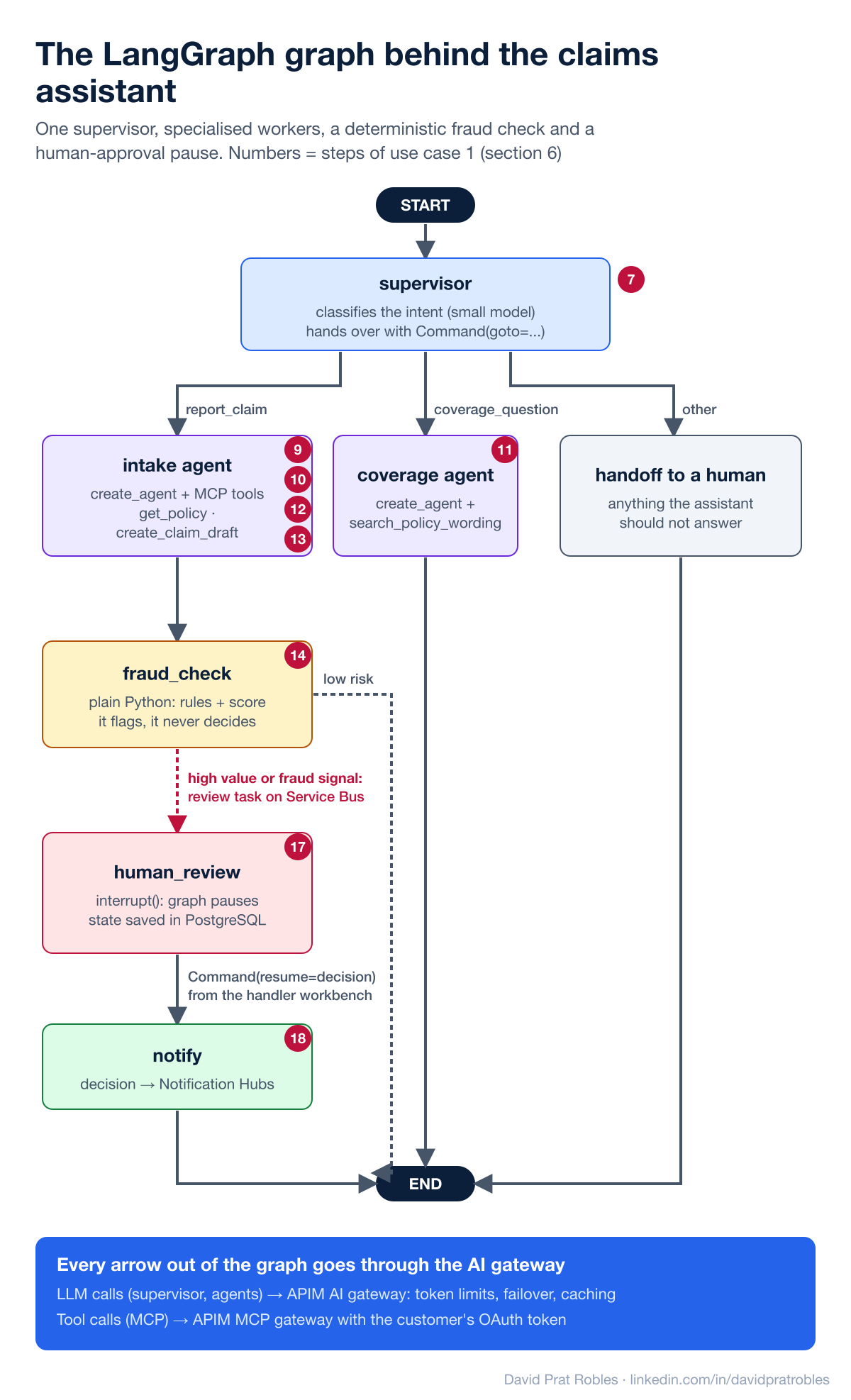
For this claims assistant, a flat supervisor is enough: one supervisor node and a handful of workers. A hierarchical design (a top supervisor whose workers are themselves supervisor graphs, for example a claims team, a policy team and a billing team) pays off only when you have many agents across several domains, owned by different teams; each team then ships its own subgraph and the top level only routes between teams. Start flat and split into a hierarchy when one supervisor has too many workers to route between reliably. Both are still one LangGraph application; the step after that, one service per agent talking over A2A, is covered in the notes under the Kubernetes diagram in section 3.
Two design choices matter more than flat versus hierarchical:
- Not everything is an agent. The fraud check is plain Python (rules plus a score); it flags, it never decides. Only the steps that need language understanding are LLM agents.
- Human approval is part of the graph.
interrupt()pauses the run, the state is saved in PostgreSQL, and the claims handler's decision resumes it hours later.
The code below follows the steps of use case 1 above (step numbers in the comments). It is a sketch to show the structure, not production code: helpers such as latest_claim_draft and fraud_score, error handling and tests are left out.
1. Models through the AI gateway (steps 7–8 and 12–13). The supervisor and the agents never call Azure OpenAI directly; they call the gateway's OpenAI-compatible endpoint with an alias, and the gateway picks the deployment, applies token limits and fails over between regions.
import os
from langchain_openai import ChatOpenAI

GATEWAY = "https://apim.insurer.eu/ai/v1"     # OpenAI-compatible endpoint of the AI gateway
PRODUCT_KEY = os.environ["APIM_PRODUCT_KEY"]  # identifies the product: quotas, budgets, metrics

router_llm = ChatOpenAI(base_url=GATEWAY, api_key=PRODUCT_KEY, model="mini", temperature=0)
writer_llm = ChatOpenAI(base_url=GATEWAY, api_key=PRODUCT_KEY, model="reasoning")
2. Tools through the MCP gateway (steps 9–10). The core APIs are exposed as MCP servers behind APIM, and the agent calls them with the customer's own token, so it can only see that customer's policy and claims.
from langchain_mcp_adapters.client import MultiServerMCPClient

def mcp_client(customer_token: str) -> MultiServerMCPClient:
    auth = {"Authorization": f"Bearer {customer_token}"}
    return MultiServerMCPClient({
        "policy": {"transport": "streamable_http", "url": "https://apim.insurer.eu/mcp/policy", "headers": auth},
        "claims": {"transport": "streamable_http", "url": "https://apim.insurer.eu/mcp/claims", "headers": auth},
    })
3. Retrieval scoped to the customer's policy (step 11; step 6 in use case 2). The policy id comes from the validated request context, never from the model, so a prompt cannot make the agent read someone else's policy.
from dataclasses import dataclass
from azure.identity import DefaultAzureCredential
from azure.search.documents import SearchClient
from langchain.tools import tool, ToolRuntime

@dataclass
class Ctx:
    customer_id: str
    policy_id: str            # taken from the validated token by the API, not from the prompt

search = SearchClient(os.environ["SEARCH_URL"], "policy-wordings", DefaultAzureCredential())

@tool
def search_policy_wording(query: str, runtime: ToolRuntime[Ctx]) -> str:
    """Search the clauses of the customer's own policy wording."""
    hits = search.search(search_text=query, top=5,
                         filter=f"policy_id eq '{runtime.context.policy_id}'",
                         query_type="semantic", semantic_configuration_name="default")
    return "\n\n".join(f"[{h['clause_id']}] {h['text']}" for h in hits)
4. The worker agents (steps 9–13). Each worker is a small tool-calling agent with its own prompt and tools.
from langchain.agents import create_agent

def build_workers(mcp_tools: dict):
    intake = create_agent(
        model=writer_llm,
        tools=[mcp_tools["get_policy"], mcp_tools["create_claim_draft"]],
        system_prompt="Collect the first notice of loss. Ask only for missing data. Never promise a payout.",
        context_schema=Ctx)
    coverage = create_agent(
        model=writer_llm,
        tools=[search_policy_wording],
        system_prompt="Answer only from the retrieved clauses and cite their ids. If unsure, offer a person.",
        context_schema=Ctx)
    return intake, coverage
5. The supervisor (step 7). It classifies the intent with the small model and hands over with Command; this is the "routing" that belongs to the application.
from typing import Literal
from pydantic import BaseModel
from langgraph.graph import MessagesState
from langgraph.types import Command

class ClaimsState(MessagesState):
    intent: str | None
    claim_id: str | None
    decision: dict | None

class Route(BaseModel):
    intent: Literal["report_claim", "coverage_question", "other"]

def supervisor(state: ClaimsState) -> Command[Literal["intake", "coverage", "handoff_to_human"]]:
    route = router_llm.with_structured_output(Route).invoke(state["messages"])
    goto = {"report_claim": "intake", "coverage_question": "coverage"}.get(route.intent, "handoff_to_human")
    return Command(goto=goto, update={"intent": route.intent})
6. Fraud signals and human approval (steps 14 and 17–18). A deterministic node posts a review task through the Claims MCP server and pauses the graph; the handler's decision resumes it, and the last node publishes the decision for the push notification.
from langchain.messages import AIMessage
from langgraph.types import interrupt

def make_fraud_check(mcp_tools: dict):
    async def fraud_check(state: ClaimsState) -> Command[Literal["human_review", "__end__"]]:
        claim = latest_claim_draft(state["messages"])   # parsed from the create_claim_draft result
        if claim.amount_eur > 5_000 or fraud_score(claim) > 0.7:          # rules + score: flags only
            await mcp_tools["create_review_task"].ainvoke({"claim_id": claim.id})  # -> Service Bus
            return Command(goto="human_review", update={"claim_id": claim.id})
        return Command(goto="__end__", update={"claim_id": claim.id})
    return fraud_check

def handoff_to_human(state: ClaimsState):
    return {"messages": [AIMessage("I'll put you in touch with a member of our team.")]}

def human_review(state: ClaimsState):
    decision = interrupt({"claim_id": state["claim_id"], "reason": "high value or fraud signal"})
    return {"decision": decision}                       # runs again when the handler resumes

def make_notify(mcp_tools: dict):
    async def notify(state: ClaimsState):
        await mcp_tools["publish_decision"].ainvoke({"claim_id": state["claim_id"], **state["decision"]})
        return {"messages": [AIMessage(f"Claim {state['claim_id']}: {state['decision']['status']}.")]}
    return notify
7. Assembling the graph (the checkpoint of step 14). The graph is built per request because the MCP tools carry the customer's token; the PostgreSQL checkpointer is what lets a claim wait for a person for hours.
from langgraph.graph import StateGraph, START, END

async def build_graph(customer_token: str, checkpointer):
    mcp_tools = {t.name: t for t in await mcp_client(customer_token).get_tools()}
    intake, coverage = build_workers(mcp_tools)

    g = StateGraph(ClaimsState, context_schema=Ctx)
    g.add_node("supervisor", supervisor)
    g.add_node("intake", intake)
    g.add_node("coverage", coverage)
    g.add_node("fraud_check", make_fraud_check(mcp_tools))
    g.add_node("human_review", human_review)
    g.add_node("notify", make_notify(mcp_tools))
    g.add_node("handoff_to_human", handoff_to_human)
    g.add_edge(START, "supervisor")
    g.add_edge("intake", "fraud_check")
    g.add_edge("coverage", END)
    g.add_edge("human_review", "notify")
    g.add_edge("notify", END)
    g.add_edge("handoff_to_human", END)
    return g.compile(checkpointer=checkpointer)
8. The API around it (steps 3, 16 and 17). One call runs a turn and streams tokens back through APIM and Front Door; the claims handler workbench later resumes the same conversation thread with its decision.
from langgraph.checkpoint.postgres.aio import AsyncPostgresSaver

async def chat_turn(conversation_id, text, customer_token, ctx: Ctx):        # step 3
    async with AsyncPostgresSaver.from_conn_string(os.environ["PG_URI"]) as saver:
        graph = await build_graph(customer_token, saver)
        config = {"configurable": {"thread_id": conversation_id}}
        async for chunk, _meta in graph.astream({"messages": [("user", text)]}, config,
                                                context=ctx, stream_mode="messages"):
            yield chunk.content                                               # step 16

async def handler_decision(conversation_id, decision: dict, service_token, ctx: Ctx):  # step 17
    async with AsyncPostgresSaver.from_conn_string(os.environ["PG_URI"]) as saver:
        graph = await build_graph(service_token, saver)
        config = {"configurable": {"thread_id": conversation_id}}
        await graph.ainvoke(Command(resume=decision), config, context=ctx)     # -> notify, step 18
On Kubernetes instead of Container Apps, this same service would simply run as the agent pods of the self-hosted diagram in section 3; nothing in the graph changes.
Notice what is not in this code: no API keys of the model provider, no retry-on-429 logic, no token counting, no list of regions. All of that lives in the AI gateway, so the platform team can change models, limits or guardrails without touching the agents, and the product team can change the graph without touching the platform.
What this design buys the insurer
- Freedom to change models and regions without touching agent code: the gateway is the only place that knows which deployment serves each call.
- Cost transparency: token metrics per product and per journey, and cheap answers for repeated generic questions.
- Audit evidence by default: every model, tool and agent call is logged with the customer, the agent, the tool and the prompt version.
- Safety where it matters: agents prepare and recommend; humans approve payouts.
- No rewrite of the core: the system of record keeps working as before, behind MCP tools and Service Bus.
Start smaller: the same design as a proof of concept
Nobody should build the full picture first. Before asking for the production budget, the insurer needs a first version that shows both use cases working, in front of the people who decide, in a few weeks. The proof of concept (PoC) is not a throwaway demo; it is the same design with everything removed that only real customers, real money and real scale make necessary.
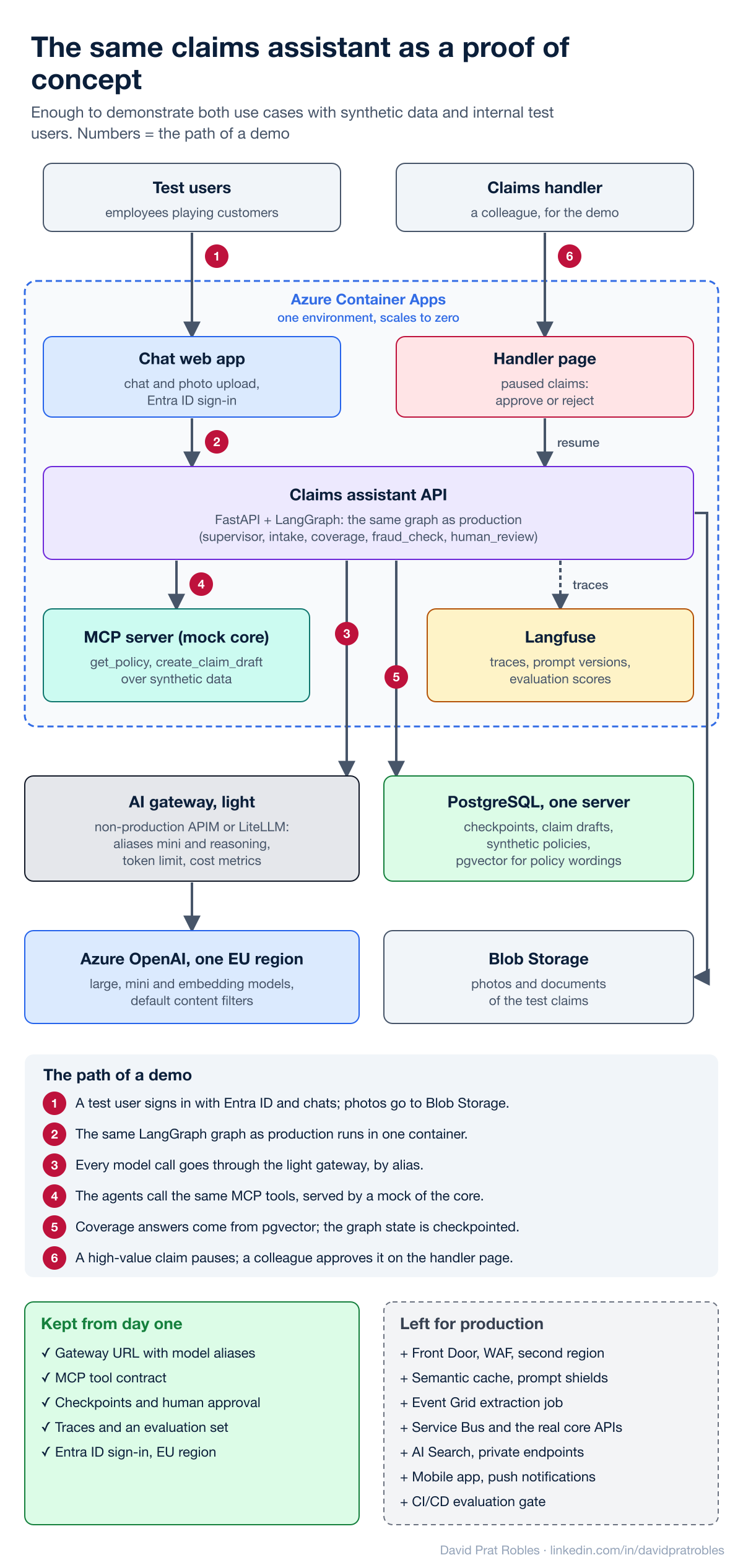
What makes the cuts possible is one rule: synthetic data and internal test users only. With no customer data and no payouts, most of the security, resilience and governance components can wait.
- Compute: one Azure Container Apps environment with four small containers: a chat web app with photo upload (it stands in for the mobile app and the website), a page for the claims handler, the claims assistant API and a mock MCP server. Sign-in uses the built-in Microsoft Entra ID authentication of Container Apps, restricted to employees.
- The graph: the same LangGraph graph as in production, with the supervisor, the intake and coverage agents, the fraud check and the human-approval pause. This is the part the PoC exists to prove, so it is not simplified.
- Tools: one MCP server that exposes
get_policyandcreate_claim_draftwith the same names and schemas the real ones will have, backed by a few dozen synthetic policies and customers. Moving to production means pointing the agents to the real MCP servers, not rewriting them. - Models: Azure OpenAI in one EU region, reached through a light gateway: a non-production API Management instance with only the token limit and token metric policies, or LiteLLM in a container. The code already asks for the aliases
miniandreasoning, so cost per conversation is measured from the first day. - State and retrieval: one PostgreSQL server holds the checkpoints, the claim drafts, the synthetic policies and, with pgvector, the policy wordings. For a few dozen documents, a vector search filtered by policy is enough; Azure AI Search arrives when the volume and the ranking quality require it.
- Photos and documents: uploaded to Blob Storage and read directly by the multimodal model inside the request. The asynchronous extraction job with Document Intelligence and Content Understanding is a production concern, but extraction quality on real-looking repair estimates is something the PoC should measure.
- Human approval: a high-value claim pauses with
interrupt(), and a colleague approves it on the handler page, which resumes the graph. No Service Bus and no push notifications: the decision appears in the chat. - Observability and evaluation: Langfuse for traces, prompt versions and scores, plus a small evaluation set (for example 50 coverage questions with the expected clauses and 20 claim scenarios) that is run by hand before every demo.
Five things I would not cut, even in a PoC, because adding them later means rewriting the application: the gateway URL with model aliases, the MCP tool contract, checkpoints with human approval, traces with an evaluation set, and real sign-in in an EU region.
What the PoC has to answer before anyone funds production: are the coverage answers grounded in the right clauses on the evaluation set, do test users complete a claim report without help, what does a conversation cost and how long does it take, and do the claims handlers trust what they are asked to approve. Agree the thresholds before the first demo, not after it.
The path to production is then additive: the real core APIs behind the MCP servers and Service Bus, Front Door with the WAF, the second region, the semantic cache and prompt shields, the extraction job, AI Search, private endpoints, Purview and the evaluation gate in CI/CD. None of those steps changes the graph.
The same design on AWS, Google Cloud, or a cloud-independent stack
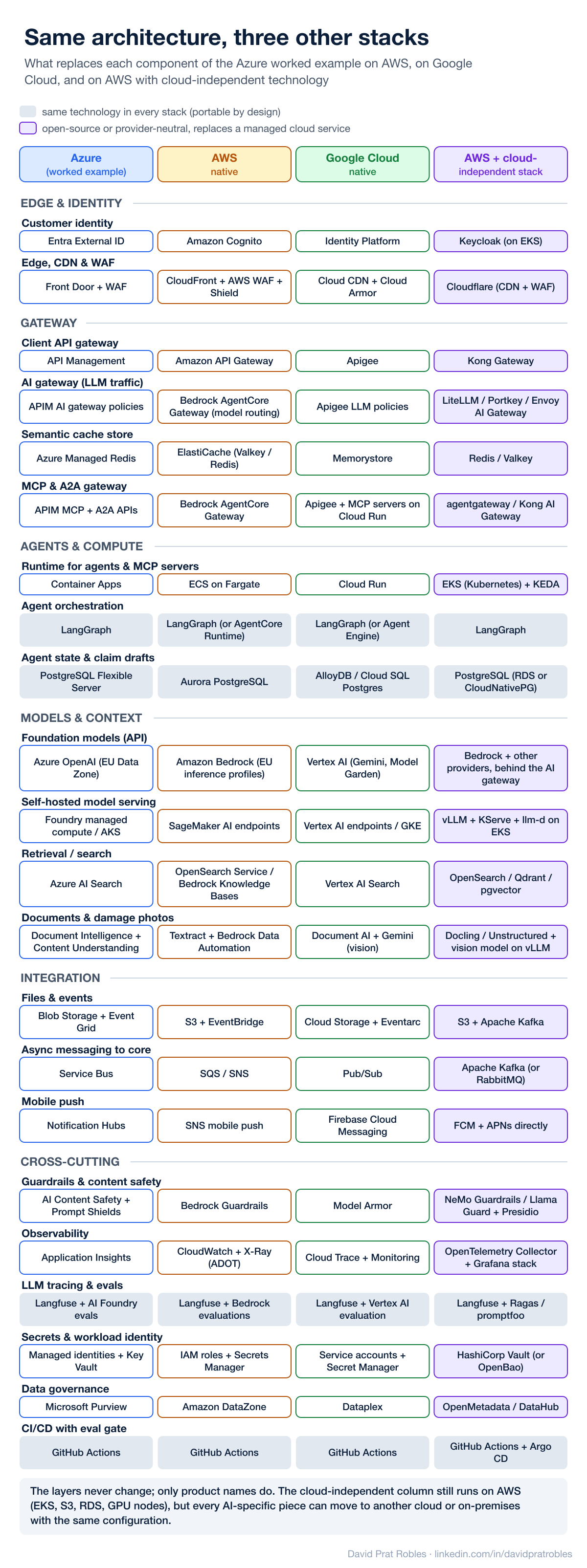
Nothing in this architecture is Azure-specific except the product names. The infographic maps every component to its equivalent in three other stacks:
- AWS native: Cognito for customer identity, CloudFront with AWS WAF and Shield at the edge, Amazon API Gateway for the apps, Bedrock with EU cross-region inference profiles and Bedrock Guardrails for the models, Bedrock AgentCore Gateway as the AI gateway (model routing across providers, tools over MCP and A2A passthrough), ECS on Fargate for the agents, Aurora PostgreSQL for state, OpenSearch or Bedrock Knowledge Bases for retrieval, Textract for documents and Bedrock Data Automation for the damage photos, S3 with EventBridge, SQS/SNS towards the core and CloudWatch with X-Ray for observability.
- Google Cloud native: Identity Platform, Cloud CDN with Cloud Armor, Apigee as the client and AI gateway, Vertex AI (Gemini and the Model Garden) for the models, Model Armor for guardrails, Cloud Run for the agents and MCP servers, AlloyDB or Cloud SQL for PostgreSQL, Vertex AI Search, Document AI for documents and Gemini for the photos, Cloud Storage with Eventarc, Pub/Sub and Firebase Cloud Messaging.
- AWS with a cloud-independent stack: the infrastructure is still AWS (EKS, S3, RDS), but every platform-specific piece is replaced by a portable one. Keycloak for identity, Cloudflare at the edge, Kong Gateway for the APIs, LiteLLM, Portkey or Envoy AI Gateway as AI gateway in front of Bedrock, other providers and the self-hosted models, which run on GPU nodes in EKS with vLLM as the runtime, KServe as the control plane and llm-d for cache-aware routing, agentgateway or Kong AI Gateway for MCP and A2A, Kubernetes with KEDA for compute, OpenSearch, Qdrant or pgvector for retrieval, Docling or Unstructured for documents and an open vision-language model served with vLLM for the photos, Apache Kafka for events and messaging, NeMo Guardrails, Llama Guard and Presidio for safety, the OpenTelemetry Collector with the Grafana stack for observability, HashiCorp Vault for secrets and OpenMetadata or DataHub for governance.
What stays the same in every column is telling: LangGraph, PostgreSQL, Langfuse and the CI/CD evaluation gate. Those are the pieces that carry the business logic, the state and the quality evidence, so they are worth keeping portable from day one.
How to choose between the columns:
- Cloud-native gives you the fastest start, managed security and one support contract, at the price of lock-in to that provider's model catalogue and gateway features. It fits best when the company has already standardised on one cloud.
- Cloud-independent gives you freedom to move models and workloads between clouds or on-premises, and one configuration for several regions or subsidiaries, at the price of operating more components yourself (Kubernetes, Kafka, Keycloak, the gateway). It fits multi-cloud groups, regulated players that need an exit strategy, and teams that already run Kubernetes well.
- A pragmatic middle ground I see often: cloud-native for infrastructure, portable for the AI layer. That means managed databases, storage and messaging, with LiteLLM or Kong as the AI gateway, LangGraph for agents, MCP for tools and Langfuse with OpenTelemetry for observability.
7. LLMOps: the loop that keeps AI applications honest
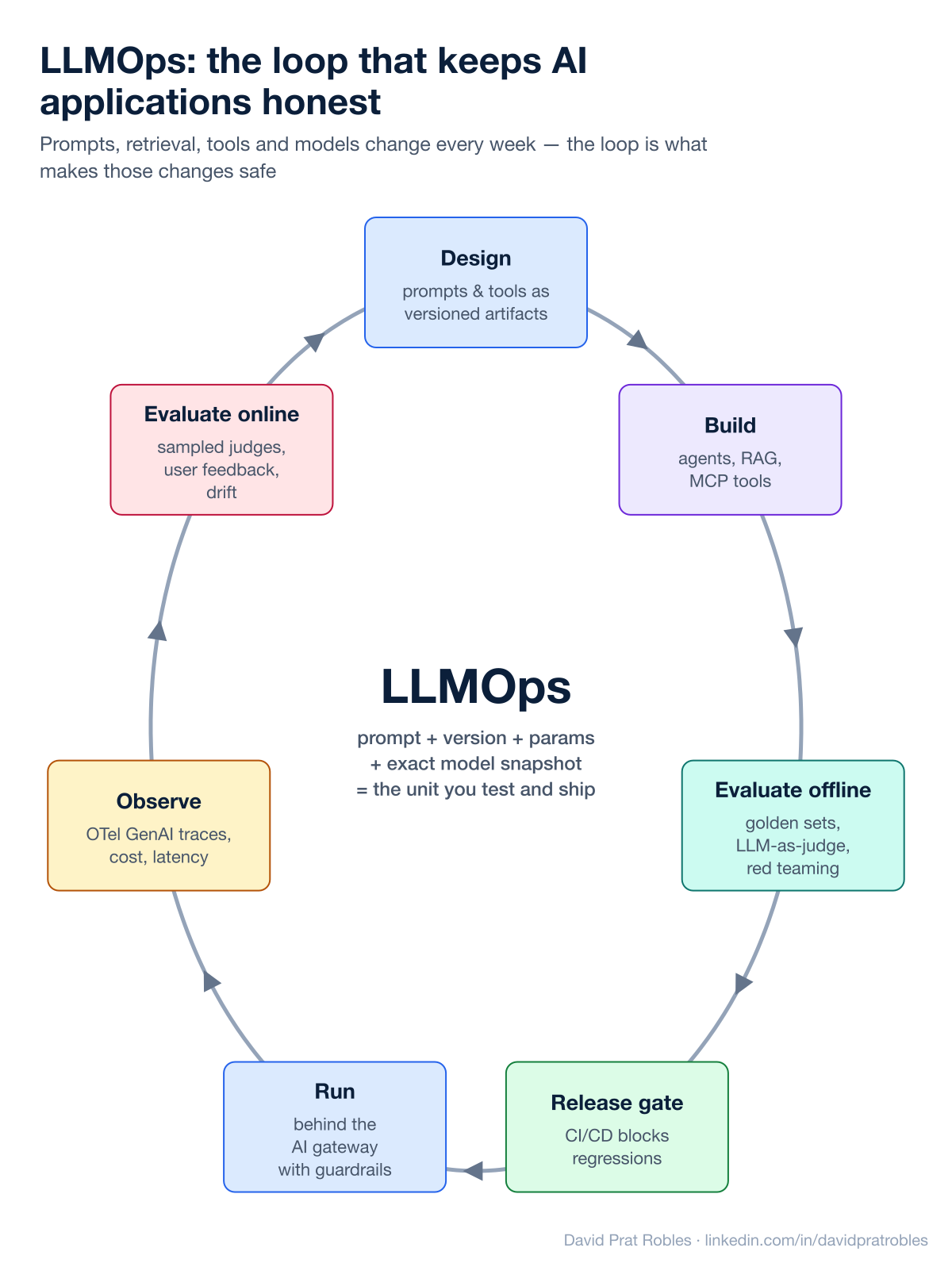
In a classic application, a release changes code. In an AI application, the behaviour changes when someone edits a prompt, re-indexes documents, adds a tool or the provider updates a model snapshot. LLMOps is the loop that makes those changes safe:
- Design: prompts and tool definitions are versioned artifacts, not string literals. The unit you test and ship is prompt + version + parameters + exact model snapshot.
- Build: agents, retrieval and MCP tools, with their configuration in the repository.
- Evaluate offline: golden datasets, LLM-as-judge scoring, task-specific metrics and red teaming.
- Release gate: CI/CD blocks regressions on quality, safety, latency and cost.
- Run: behind the AI gateway, with guardrails and routing.
- Observe: traces that follow the OpenTelemetry GenAI semantic conventions (standard
gen_ai.*attributes for model, tokens and finish reasons), so a span from a LangGraph agent looks the same as a raw model call, with prompt versions and eval scores attached to the spans (Uptrace overview). - Evaluate online: sample production traffic with automated judges, collect user feedback and watch for drift, then feed what you learn back into design.
Two lessons from practice: redact PII before traces are stored, not after, and treat cost (including cached tokens) as a first-class metric, otherwise your FinOps dashboard will lie to you.
8. DLOps: when you own the models
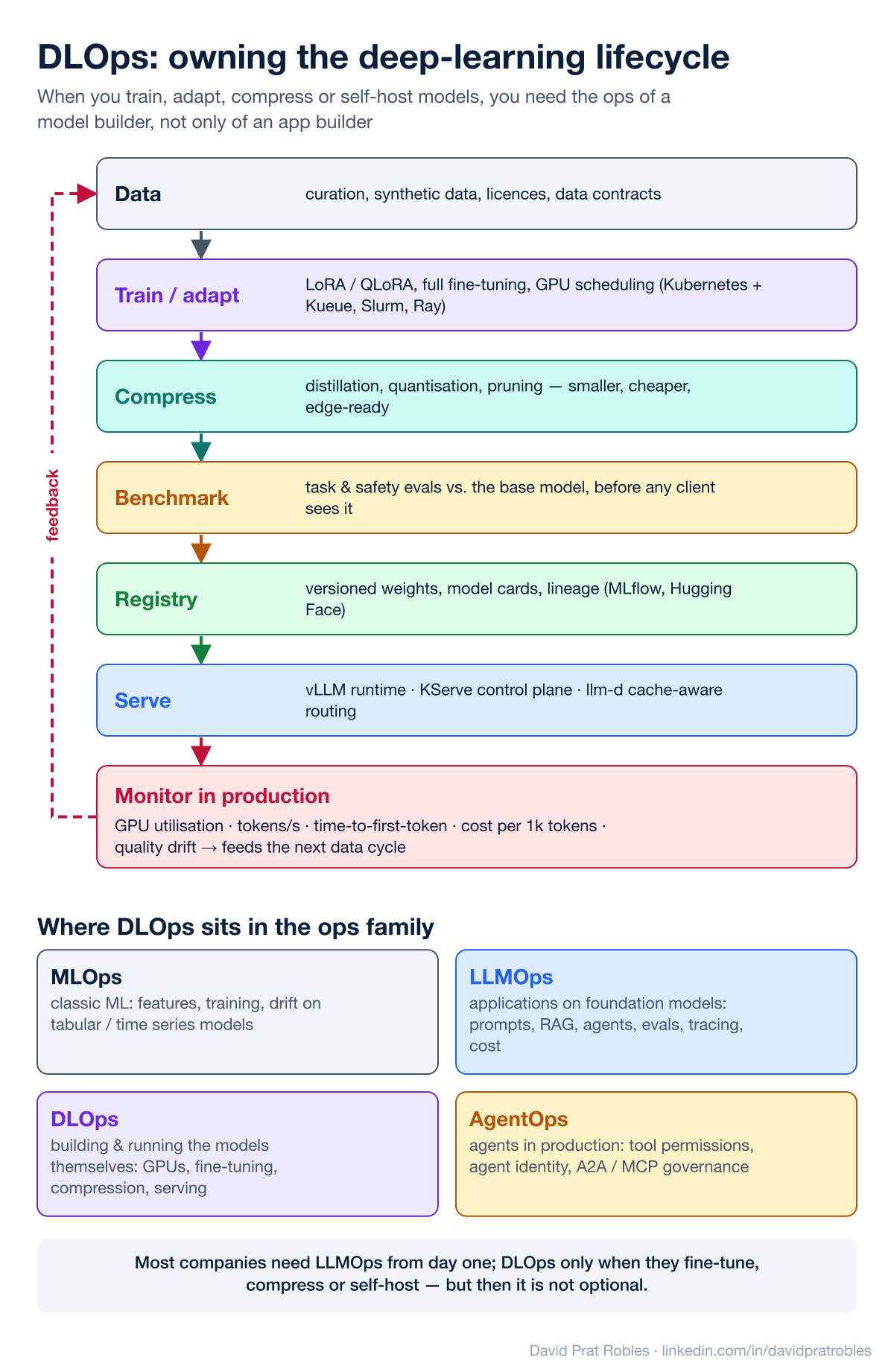
LLMOps is enough while you consume models through APIs. The moment you fine-tune, compress or self-host, you need the operations of a model builder. I call that DLOps (deep-learning operations):
- Data: curation, synthetic data, licences and data contracts.
- Train or adapt: LoRA/QLoRA or full fine-tuning, with GPU scheduling on Kubernetes (Kueue), Slurm or Ray.
- Compress: distillation, quantisation and pruning, so models get smaller, cheaper and edge-ready. At Multiverse this was the core of the business: making LLMs small enough to run on-premises or on devices without losing what the client needs.
- Benchmark: task and safety evaluations against the base model before any client sees it.
- Registry: versioned weights, model cards and lineage.
- Serve: the stack that has emerged is vLLM as the inference runtime, KServe as the Kubernetes control plane and llm-d for KV-cache-aware routing across replicas. The KServe and llm-d projects report up to ~57× faster P90 time-to-first-token and ~2× throughput in their published benchmarks versus naive load balancing (KServe blog).
- Monitor: GPU utilisation, tokens per second, time-to-first-token, cost per thousand tokens and quality drift, which feed the next data cycle.
How the ops family fits together: MLOps for classic models, LLMOps for applications on foundation models, DLOps for building and running the models themselves, and an emerging AgentOps for agents in production (tool permissions, agent identity, MCP and A2A governance). Most companies need LLMOps from day one; DLOps only when they fine-tune, compress or self-host, but then it is not optional.
9. The tooling market: who leads in MLOps, LLMOps, DLOps and AgentOps
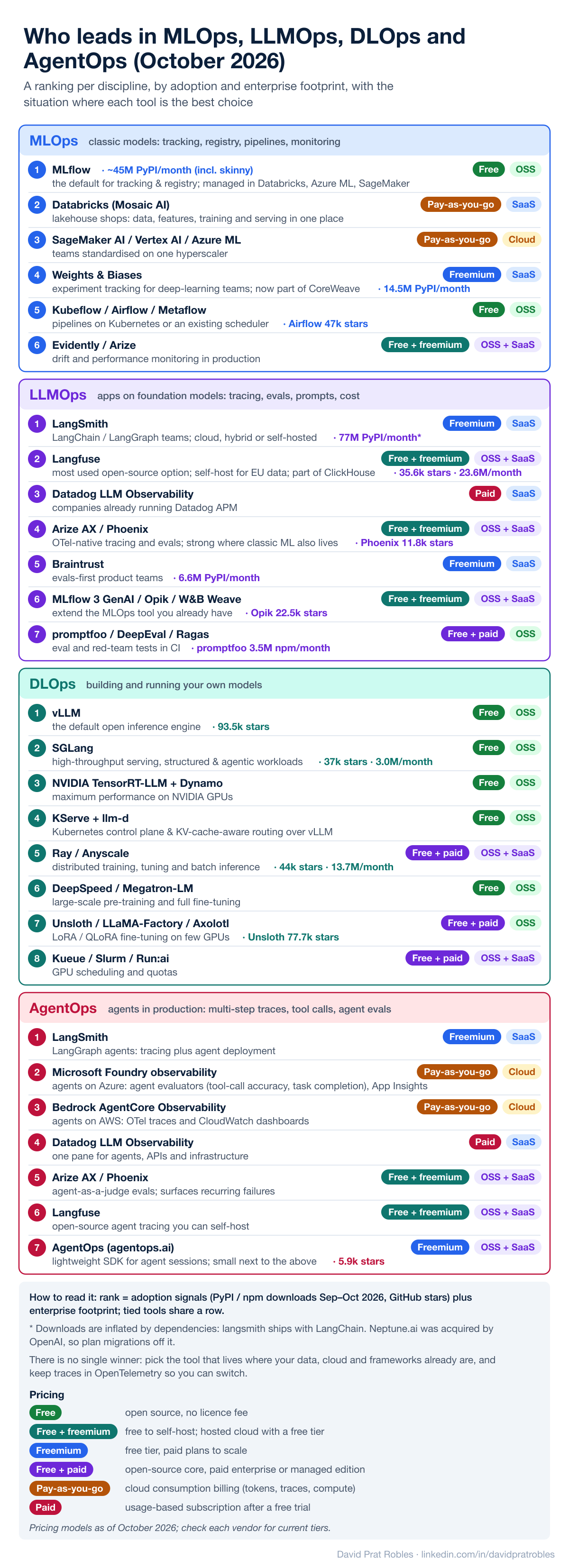
Every discipline above has its own crowded market, and the vendor pages all claim to do everything. Below is my ranking for each one as of October 2026. It is based on adoption signals (PyPI and npm downloads in the last month, GitHub stars) and on how often each tool shows up in enterprise stacks. Each entry also says how it is priced: free open source, freemium, pay-as-you-go cloud billing or paid. Download counts are a rough guide: langsmith is installed with every LangChain project, and Datadog's tracer counts all of its APM users.
MLOps (classic models: experiment tracking, registry, pipelines, monitoring)
- MLflow: the de facto standard for experiment tracking and the model registry, and the one most other platforms embed: it is managed inside Databricks, Azure Machine Learning and SageMaker. Around 45 million monthly downloads, counting the lightweight client. Free, open source.
- Databricks (Mosaic AI): the natural choice when data already lives in the lakehouse; features, training, registry and serving sit in one governed place. Pay-as-you-go cloud billing.
- SageMaker AI, Vertex AI, Azure Machine Learning: the default for teams standardised on one hyperscaler. Pay-as-you-go cloud billing.
- Weights & Biases: the favourite for experiment tracking in deep-learning teams; now part of CoreWeave. Freemium: free tier, paid plans to scale.
- Kubeflow, Airflow, Metaflow: pipelines, depending on whether you live on Kubernetes or already run a scheduler. Free, open source.
- Evidently (open source) and Arize: drift and performance monitoring once models are in production. Free to self-host; hosted cloud with a free tier.
Neptune.ai was acquired by OpenAI, so anyone still on it should plan a migration.
LLMOps (applications on foundation models: tracing, evaluations, prompt versions, cost)
- LangSmith: the most widely deployed, because it comes with LangChain and LangGraph. It is framework-agnostic and runs in the cloud, hybrid or self-hosted. Freemium: free tier, paid plans to scale.
- Langfuse: the most used open-source option (MIT licence, about 35,000 GitHub stars and 23 million monthly downloads). It is the usual pick when traces must stay in your own EU tenant. Part of ClickHouse since January 2026. Free to self-host; hosted cloud with a free tier.
- Datadog LLM Observability: the pragmatic choice when the company already runs Datadog: LLM traces sit next to the APIs and infrastructure they depend on. Paid, usage-based, after a free trial.
- Arize AX and Phoenix (open source): OpenTelemetry-native tracing and strong evaluations; a good fit where classic ML monitoring also lives. Free to self-host; hosted cloud with a free tier.
- Braintrust: evaluation-first, popular with product teams that ship prompts weekly. Freemium: free tier, paid plans to scale.
- MLflow 3, Opik (Comet) and W&B Weave: the GenAI extensions of the MLOps tools you may already own. Free to self-host; hosted cloud with a free tier.
- promptfoo, DeepEval and Ragas: open-source test frameworks for evaluations and red teaming in CI, used alongside any of the platforms above. Free open-source core; paid enterprise or managed edition.
DLOps (building and running your own models)
- vLLM: the default open inference engine (about 93,000 GitHub stars). Free, open source.
- SGLang: the main alternative, very strong on throughput and on structured and agentic workloads. Free, open source.
- NVIDIA TensorRT-LLM with Dynamo: when you want the last bit of performance from NVIDIA GPUs. Free, open source.
- KServe + llm-d: the Kubernetes layer that turns vLLM replicas into a governed, KV-cache-aware service. Free, open source.
- Ray (and Anyscale): distributed training, tuning and batch inference. Free open-source core; paid enterprise or managed edition.
- DeepSpeed and Megatron-LM: large-scale pre-training and full fine-tuning. Free, open source.
- Unsloth, LLaMA-Factory and Axolotl: LoRA and QLoRA fine-tuning on a handful of GPUs. Free open-source core; paid enterprise or managed edition.
- Kueue, Slurm and NVIDIA Run:ai: GPU scheduling, quotas and sharing. Free open-source core; paid enterprise or managed edition.
AgentOps (agents in production: multi-step traces, tool calls, agent evaluations)
- LangSmith: the most used for LangGraph agents, combining tracing with agent deployment. Freemium: free tier, paid plans to scale.
- Microsoft Foundry observability: for agents on Azure, with agent-specific evaluators (tool-call accuracy, task completion), red teaming and Application Insights dashboards. Pay-as-you-go cloud billing.
- Amazon Bedrock AgentCore Observability: for agents on AWS, with OpenTelemetry traces and CloudWatch dashboards for sessions, latency, tokens and errors. Pay-as-you-go cloud billing.
- Datadog LLM Observability: one view for agents, the APIs they call and the infrastructure underneath. Paid, usage-based, after a free trial.
- Arize AX and Phoenix: agent-as-a-judge evaluations and automatic detection of recurring failures. Free to self-host; hosted cloud with a free tier.
- Langfuse: open-source agent tracing you can self-host. Free to self-host; hosted cloud with a free tier.
- AgentOps (agentops.ai): despite the name, a small developer SDK next to the platforms above. Freemium: free tier, paid plans to scale.
What the rankings say together:
- The disciplines are converging. The same names appear in LLMOps and AgentOps, and the MLOps leaders (MLflow, W&B, Comet) have all added GenAI tracing. Few companies will run four separate tools.
- Pick by where you already are. A LangGraph team starts with LangSmith, a Datadog company with Datadog, an Azure or AWS shop with its cloud's agent observability, and a team with strict data residency with self-hosted Langfuse or Phoenix.
- OpenTelemetry is the exit door. All the leaders accept OpenTelemetry GenAI traces; instrument once with it and changing vendor stays a configuration change, not a rewrite.
- Evaluation is the part to invest in. Tracing is becoming a commodity; good datasets, judges and release gates are what actually protect quality.
10. Regulation is part of the architecture
In Europe the EU AI Act turns several of these components (audit logs, evaluation evidence, human oversight, model inventories) from good practice into evidence you must be able to produce. The June 2026 Digital Omnibus agreement moved the obligations for stand-alone high-risk systems to 2 December 2027 and for AI embedded in regulated products to 2 August 2028 (Sidley). That is more time, not a reason to wait: the gateway logs, eval reports and model registry described above are exactly the artefacts auditors will ask for.
11. Ten questions to ask before your next AI project
- Which decisions are we automating, and where must a human stay in the loop?
- Does every agent act with the identity and permissions of the user it serves?
- Do all model, tool and agent calls go through one gateway with quotas and audit?
- Are our tools exposed once, through MCP, instead of re-implemented per agent?
- Will agents from other teams or vendors need to collaborate (A2A)?
- What is our golden dataset, and which eval scores block a release?
- Are traces standardised (OpenTelemetry GenAI) and PII-redacted before storage?
- Do we know the cost per conversation or document, including caching?
- Will we fine-tune, compress or self-host? If yes, who owns DLOps?
- Which EU AI Act risk tier applies, and can we produce the evidence today?
The model will keep changing every few months. A clear architecture, a gateway, standard protocols and a solid LLMOps/DLOps loop are what let you swap it without starting over.
I'm curious: which layer is the bottleneck in your organisation right now: identity, gateway, evaluation, or GPUs?
Diagrams: my own. Sources linked inline.
#AI #GenAI #AIArchitecture #LLMOps #MLOps #AIAgents #MCP #A2A #AIGateway #EnterpriseAI #CloudArchitecture #EUAIAct